
There is a problem with quite a lot of marketing.
You put your website address on a brochure, exhibition stand, poster, presentation, advert, email or somewhere else.
Somebody sees it.
They may be interested enough to visit your website.
But when they eventually arrive, how do you know what prompted them to visit?
Sometimes you can work that out from your analytics. Sometimes you can’t.
This is where vanity URLs can be particularly useful.
A vanity URL gives somebody a short, memorable website address that is easy to type, remember, photograph or write down.
And importantly, it does not mean creating another website page.
You can make that short address automatically redirect visitors to an existing page on your website, while also adding tracking information behind the scenes so that you have a much better idea where those visitors came from.
For example, someone might see:
yourdomainhere.com/offer
But when they type that into their browser, they are automatically sent to an existing page such as:
yourdomainhere.com/services/special-offer/
And if you want to track the marketing activity that generated the visit, the redirect can actually send them to:
yourdomainhere.com/services/special-offer/?utm_source=brochure&utm_medium=offline&utm_campaign=spring_offer
The person only has to remember the simple version.
You get the tracking information.
That is essentially the idea.
A vanity URL is simply a short, memorable web address that redirects somebody somewhere else.
It will normally use your existing domain.
So rather than expecting someone to remember:
yourdomainhere.com/services/commercial-energy-efficiency-consultancy/
you might give them:
yourdomainhere.com/energy
When someone enters the shorter address, your website automatically sends them to the longer destination.
The vanity URL does not need to contain a separate page.
It can simply act as a doorway to a page that already exists.
That is an important distinction because you are not creating duplicate website content every time you create a new marketing campaign.
You are simply creating another route into an existing page.
There is a small amount of technical setup involved.
Your website needs a redirect rule.
That rule basically says:
When someone visits:
yourdomainhere.com/offer
send them here instead:
yourdomainhere.com/services/special-offer/
Once that rule has been created, the redirect happens automatically.
The visitor doesn’t need to do anything else.
Depending on your website setup, there are a range of ways to do this …
If your website is built in WordPress, redirects can normally be created using a redirect plugin or through functionality included within some SEO plugins.
You usually enter two things:
Source:
/offer
Destination:
https://yourdomainhere.com/services/special-offer/
Save the redirect and the short URL is ready to use.
If you want the campaign to be tracked, the destination could instead be:
https://yourdomainhere.com/services/special-offer/?utm_source=brochure&utm_medium=offline&utm_campaign=spring_offer
The public URL remains:
yourdomainhere.com/offer
Many hosting systems also allow redirects to be created through their control panel.
Again, the principle is exactly the same.
You tell the system which short URL somebody may enter and where you want them sent.
If you don’t manage redirects yourself, this is normally a very small job for whoever looks after your website.
You can simply ask:
Please make
yourdomainhere.com/offerredirect to this page …
and provide the destination.
If you want to track the campaign, give them the complete destination URL including the UTM parameters.
You can find out more about how to create UTM parameters further down.
When creating the redirect, you may be asked whether it should be permanent or temporary.
A 301 redirect is a permanent redirect.
A 302 is normally used when the redirect is intended to be temporary.
For most vanity URLs that you are likely to continue using, a 301 will probably be the obvious choice.
For example, if:
yourdomainhere.com/brochure
is going to be used in printed material for the foreseeable future, there is little reason for that shortcut to disappear.
A temporary campaign may be different.
You don’t need to become an expert in HTTP status codes to use vanity URLs. If you are unsure, ask whoever manages your website.
For most straightforward, ongoing vanity URLs, I would normally expect a 301 to be used.
This is probably the most important part of the whole idea.
The short URL only works properly if people can remember it.
A vanity URL shouldn’t merely be shorter than the original page address.
It should be easy to:
For example:
yourdomainhere.com/guide
is considerably more useful than:
yourdomainhere.com/2026-business-growth-download
if somebody has to remember it after seeing it briefly.
Think about how people encounter URLs in real life.
Somebody may see an address on a poster while walking past it.
They may photograph it.
They may write it into their phone.
They may hear somebody mention it during a presentation.
They may notice it during a webinar and type it in afterwards.
They might see it inside a PDF and return to it later.
The easier that address is to remember, the more likely they are to use it.
Vanity URLs are often associated with offline marketing, but there is no reason to limit them to that.
They can be useful anywhere people may see a web address without necessarily clicking it immediately.
You could use a vanity URL on:
Imagine seeing:
yourdomainhere.com/show
on an exhibition stand.
That is considerably easier to remember than a long URL containing several folders and words.
They can be just as useful online.
For example:
Even online, people don’t always click immediately.
They might see the URL and come back to it later.
That is where a memorable shortcut helps.
This is the important next step.
Suppose you create:
yourdomainhere.com/show
and redirect it to:
yourdomainhere.com/services/blue-widgets
That is useful from a usability point of view.
But if someone visits, you may still have limited information about which marketing activity generated them.
This is where UTM parameters become useful.
UTM parameters are pieces of tracking information added to the end of a URL.
The easiest way to create them is via the free Google Campaign URL builder.
Three of the most commonly used are:
utm_sourceutm_mediumutm_campaignFor example, rather than redirecting your vanity URL to:
yourdomainhere.com/services/blue-widgets
you could redirect it to:
yourdomainhere.com/services/blue-widgets?utm_source=kent_expo&utm_medium=offline&utm_campaign=winter_2026
The person visiting never has to remember that.
They simply type:
yourdomainhere.com/show
The redirect handles everything else.
That is what makes vanity URLs particularly useful.
You can have a very clean public-facing address while still collecting much more useful campaign information behind the scenes.
There isn’t one universal naming convention that every business has to use.
The important thing is consistency.
For example, your exhibition campaign might use:
utm_source=kent_expo
utm_medium=offline
utm_campaign=winter_2026
A brochure could use:
utm_source=brochure
utm_medium=offline
utm_campaign=winter_2026
An email campaign could use:
utm_source=newsletter
utm_medium=email
utm_campaign=winter_2026
The exact labels are up to you.
The important thing is that six months later you can still understand what they mean.
This is where the approach becomes particularly useful.
You might have one important landing page on your website:
yourdomainhere.com/services/special-offer/blue-widgets
You could then create:
yourdomainhere.com/show
yourdomainhere.com/brochure
yourdomainhere.com/webinar
yourdomainhere.com/poster
They could all lead to exactly the same website page.
But each one could use different UTM parameters.
The exhibition vanity URL might redirect to:
yourdomainhere.com/services/special-offer/blue-widgets?utm_source=exhibition&utm_medium=offline&utm_campaign=winter_offer
The brochure could redirect to:
yourdomainhere.com/services/special-offer/blue-widgets?utm_source=brochure&utm_medium=offline&utm_campaign=winter_offer
The webinar could use:
utm_source=webinar
and so on.
Now you haven’t just made the URL easier for people to remember.
You’ve made the marketing much easier to analyse.
If your website is using Google Analytics 4, UTM parameters can be used to separate campaign traffic.
You can analyse things such as:
So instead of simply knowing that 200 people visited a page, you may be able to identify that:
40 came through your exhibition activity.
25 came through a brochure.
30 came through an email campaign.
That is much more useful.
It gives you some evidence about which activities are actually sending people to the website.
For those of you using my Web Success Insights Software, UTM tracking can be analysed in a slightly different way.
Within the reporting system you can filter visitors using:
utm_sourceutm_mediumutm_campaignSo if I want to see visitors from a particular brochure, email, advertising campaign or vanity URL, I can isolate that traffic.
But the part I find particularly useful is what happens afterwards.
I can then see the visitor’s journey through the website.
For example, somebody may arrive through a URL containing:
utm_source=linkedin
I can see the page they initially reached.
Then I can see which page they looked at next. Just like this:
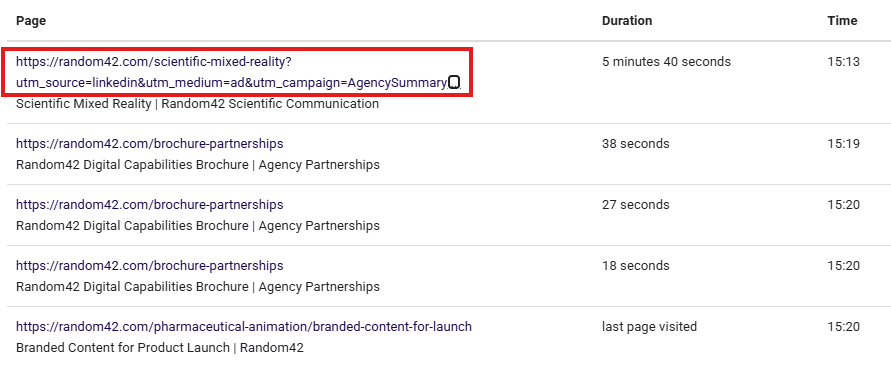
And the page after that.
That allows me to look beyond simply asking:
Did the campaign generate traffic?
I can start asking:
What did those visitors actually do?
This is ultimately far more important than the number of visits alone.
Imagine two campaigns.
Campaign A generates 100 visitors.
Most look at one page and disappear.
Campaign B generates only 40 visitors.
But those visitors go on to read service pages, look at case studies and reach the contact page.
Which campaign produced the better traffic?
Probably Campaign B.
This is where looking at visitor behaviour becomes valuable.
Depending on the tracking system you use, you may be able to investigate things such as:
That is a much better measure of marketing quality than traffic numbers alone.
QR codes have made it much easier for people to move from printed marketing to a website.
But I wouldn’t necessarily treat a QR code and a vanity URL as alternatives.
Use both.
A poster could contain:
yourdomainhere.com/offer
alongside a QR code.
Some people will scan the QR code.
Some will type the address.
Some might photograph the poster and use the URL later.
Some simply prefer knowing where a QR code is going before they scan it.
A short URL gives them that option.
You could even track QR code traffic separately from people using the vanity URL if you wanted to analyse how people were accessing the campaign.
UTM tracking can become messy surprisingly quickly.
For example:
utm_source=linkedin
utm_source=LinkedIn
and:
utm_source=LINKEDIN
may end up being treated as different values within reporting.
The same problem arises when one person calls something:
winter-show
and someone else calls it:
winter_exhibition_2026
A simple naming convention prevents this.
Decide how you are going to name:
and stick to it.
Your reporting will be much easier to interpret later.
I would also recommend maintaining a simple campaign spreadsheet.
You don’t need anything complicated.
Include columns for:
| Vanity URL | Destination page | UTM source | UTM medium | UTM campaign | Where used |
|---|---|---|---|---|---|
| yourdomainhere.com/show | /services/special-offer/ | kent_expo | offline | winter_2026 | Exhibition |
| yourdomainhere.com/brochure | /services/special-offer/ | brochure | offline | winter_2026 | Printed brochure |
| yourdomainhere.com/webinar | /services/special-offer/ | webinar | online | winter_2026 | Webinar |
That way, six or twelve months later, you can still understand exactly what each URL was created for.
There is an important limitation.
Imagine someone sees:
yourdomainhere.com/show
at an exhibition.
They remember your company name but don’t remember the URL.
The next morning they search for your business on Google and visit your website through the search results.
Your analytics may record that visit as organic search rather than attributing it to the exhibition.
The exhibition still influenced the visit.
The vanity URL simply wasn’t used.
That is the reality of marketing attribution.
No tracking system captures every influence perfectly.
Vanity URLs and UTM parameters improve the information available to you considerably, but they don’t magically solve every attribution problem.
The vanity URL itself isn’t really the interesting part.
It’s simply a tool.
The real value comes from being able to ask better questions about your marketing.
Which activity actually generated website visitors?
Did those people engage with the site?
What did they look at?
Did they reach important pages?
Did they enquire?
Did one campaign produce much better visitors than another?
That is where this all connects back to website success.
Businesses spend a considerable amount of money trying to send people to their websites.
The more accurately you can understand where those visitors came from and what they did when they arrived, the easier it becomes to make sensible decisions about where to spend the next pound.
So if you have a brochure, exhibition, presentation, advert, email, video or other campaign coming up, don’t automatically print or display a long website address.
Ask whether a short vanity URL would make the journey easier.
Then make sure that, behind that simple address, you have the tracking in place to find out whether the marketing actually worked.