
Google Ads can work brilliantly – but only if you know exactly what you’re doing, and you don’t blindly trust Google’s guidance.
For many businesses, especially those unfamiliar with the inner workings of the platform, it can become an easy way to burn through budget with little or nothing to show for it.
This will become increasingly important as AI forces more businesses towards PPC (Pay Per Click), forcing up the costs of clicks, which makes it even more important to get the best results from budgets.
This article highlights 13 common pitfalls that can make Google Ads a waste of money for many businesses. If you’re running Google Ads campaigns or are considering using them then these are the dangers to be aware of – and what you can do to avoid them.
Google uses broad match by default, which means your ad can appear for search terms that are only loosely related to your chosen keywords.
This image shows you an example of a broad match keyword of ‘commercial property lawyer’ (1), where Google made the ads visible when people searched for ‘litigation law firm London’ (2):

This is particularly relevant when first setting up a campaign because Google will encourage you to just enter keywords you want to be visible for, but it sets those up as broad match.
Unless you switch to phrase match or exact match and use negative keywords, your ads will likely trigger for irrelevant searches.
That’s great for Google’s revenue, but terrible for advertisers who end up paying for clicks from people with no real interest in what they offer. Google make $billions purely from junk clicks caused by broad match keywords.
Click into a campaign and then click on Insights and reports from the menu (1), followed by Search terms (2), which will get you to similar to this view:
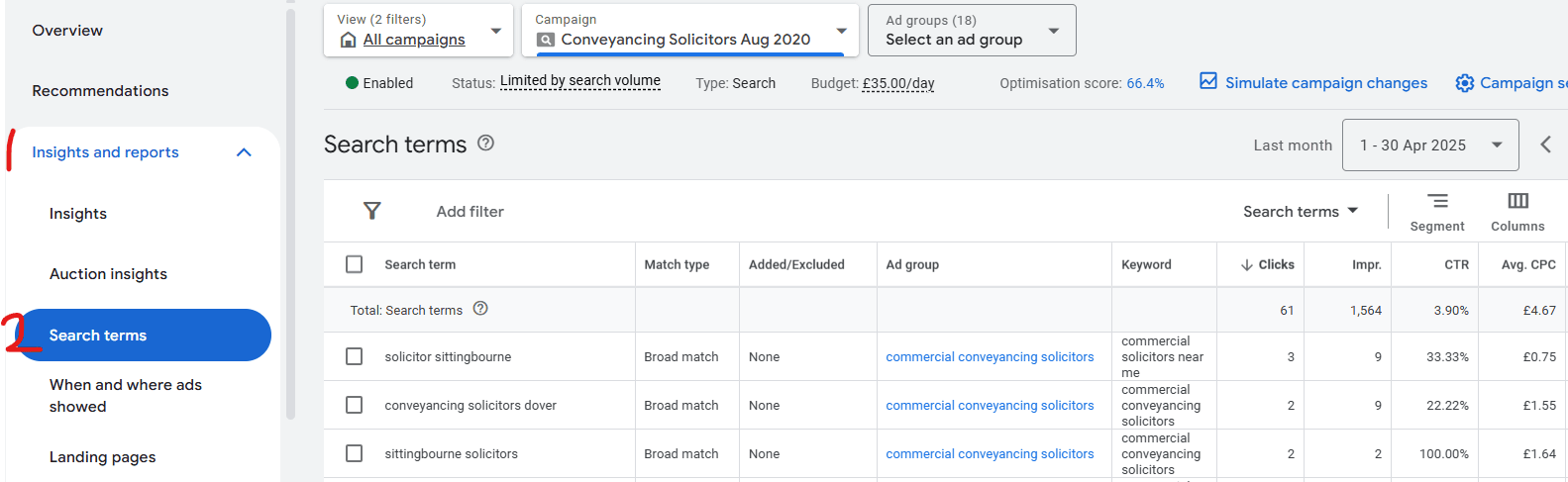
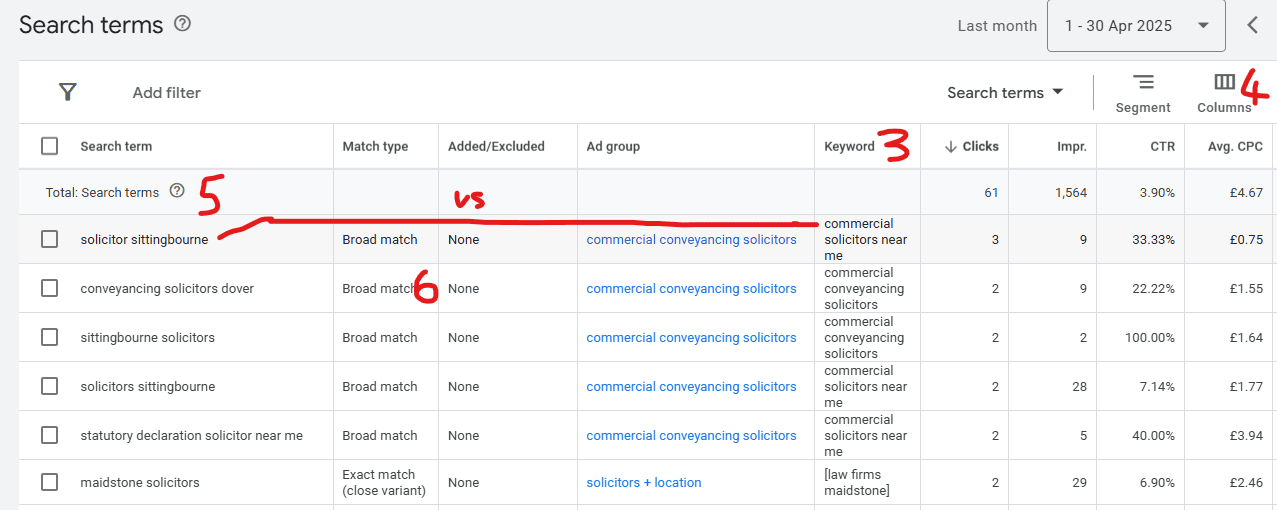
You may not see that Keyword column (3) and will need to add it via Columns (4), so that the view displays the keywords you set up. You can then look down the search terms column and compare each search term (5) – what people actually typed into Google that triggered your ad to them – to the keywords you have set up (3), particularly those that show a match type of Broad match (6):
If you’re completely lost on this just contact me and I’d be happy to (no cost) talk you through it via a Zoom.
You will likely see many search terms that are far off the context of the keyword that you thought you were getting visibility for, and broad match will be a major factor in that poor targeting. The solution is to use phrase and/or exact match in combination with negative keywords.
Even when avoiding using broad match for your keywords, phrase match and exact match can still provide off-target clicks.
By looking at your Search terms report you can get examples of how far off Google is in understanding the context of the visibility you want.
In this example you can see clicks that happened supposedly for the keyword “artwork management software” (set up as phrase match):
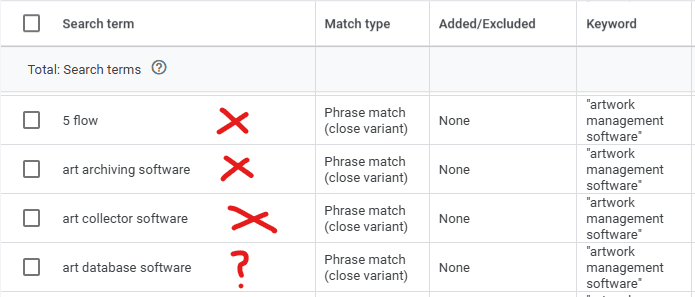
The first three are way off target, including making the ad visible for people for people who want to archive their own artworks, which conflicts with the website landing page content which is focused on corporate-level artwork management for food producers. The fourth is marked as a ? because it’s borderline relevant.
This raises an important point: the Google system is nowhere as intelligent as they portray it to be. If it was, then it wouldn’t display ads when people typed phrases that were mismatched to the landing page of the website.
Years ago, phrase match and exact match worked like in the following examples, but Google now allows itself to be more ‘fluid’ in interpretation, which is completely against the intentions of the advertisers …
“artwork management software” (phrase match) would only trigger adverts if people typed those keywords (in any order) but may have words to the left or right (e.g. “looking for artwork management software” would have triggered the ad.
[artwork management software] (exact match) would only trigger adverts when that phrase was typed on its own in exactly that order.
The system used to be fair and work for advertisers. That’s no longer the case and clicks have to be closely scrutinised to avoid wastage.
If you choose to show your ads in specific countries or regions, you might assume that only people physically in those places will see your ads.
But … Google’s default setting is to include people who have shown interest in that location – even if they’re not based there.
That means someone abroad could see your ad just because they typed in something related to your region, wasting budget on clicks that are unlikely to convert.
Go into your campaign settings and expand down Locations within Other settings, which will give you a view similar to this:
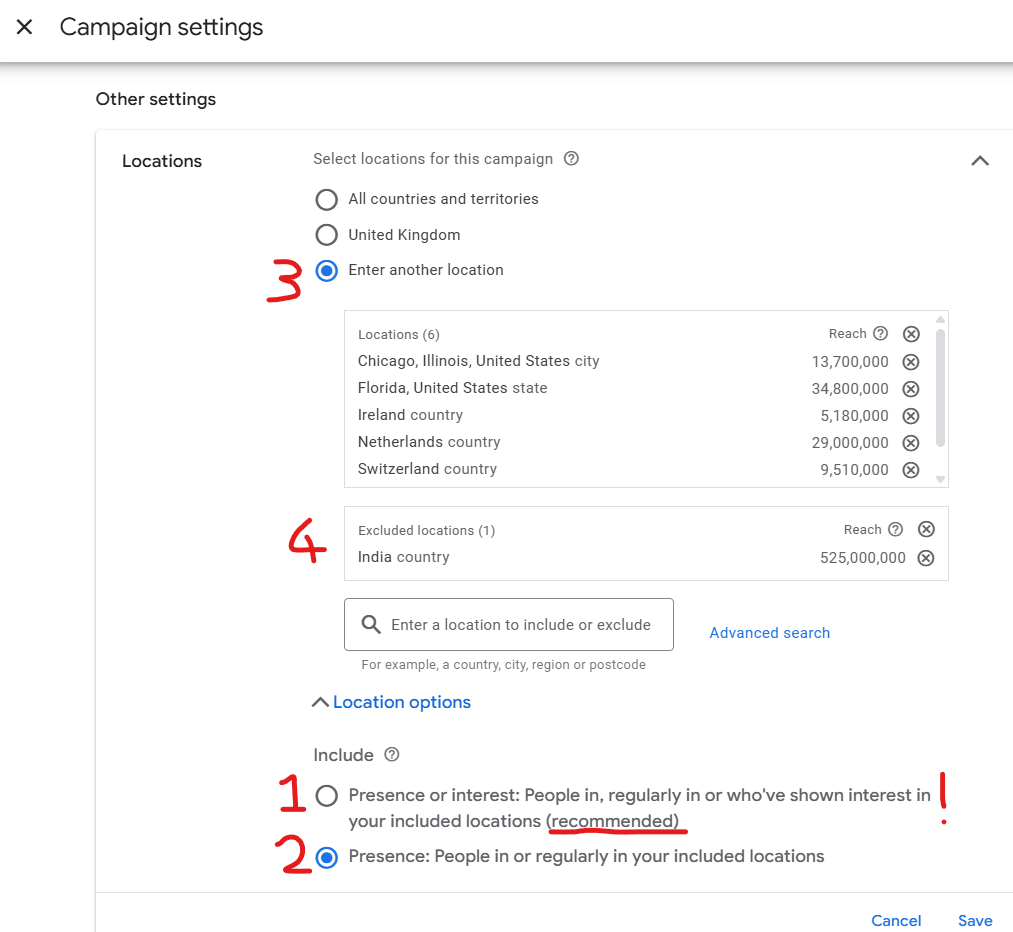
When you first set up campaigns, Google’s ‘recommended’ setting (1) will deliver some of your visibility to countries you don’t want visibility in.
For example, you sell widgets and only want to be visible to people in the UK but someone in India could search for ‘widget suppliers UK’ (with the intention of spamming you) and your ad will be visible to them. When they click it means that you are paying (for the click) for them to spam you.
You need to select the second option (2), which restricts visibility to only people who are in your targeted locations.
It’s also important to be specific about where you are or aren’t targeting your ads. In the image above it shows (3) locations that have been chosen for visibility, but it also shows (4) excluded locations.
Unfortunately, even when you have specified that you only want your ads shown to people in your locations (2), Google will sometimes show your ads to other locations, so you still need to specify where you DON’T want your ads to be seen.
Unless you spend a lot of time refining your targeting, it’s common to get clicks from students, researchers, people in job-seeking mode, and others who will never become customers.
There are very few options to exclude specific job roles or industries in most Google Ads setups, which leaves advertisers open to irrelevant traffic.
Google knows exactly what types of people are visiting your website and it could (if it wanted to – which it doesn’t) give you options to only show your ads to specific types of persona, industry types etc.
Instead, they leave it up to you to refine as much as you can within the limitations of what you can do.
Here are a couple of things that are within your control:
You’d think it’d be easy to set a limit on the ages of people viewing your ads, but it’s not.
Google don’t give you an option to set them at account or campaign level – it makes you drill down to each individual group.
Your starting point is to click into a campaign and then open the section ‘Audiences, keywords and content (1), click on Audiences (2), and then scroll down to the Demographics section (3). That will give you a view similar to this:
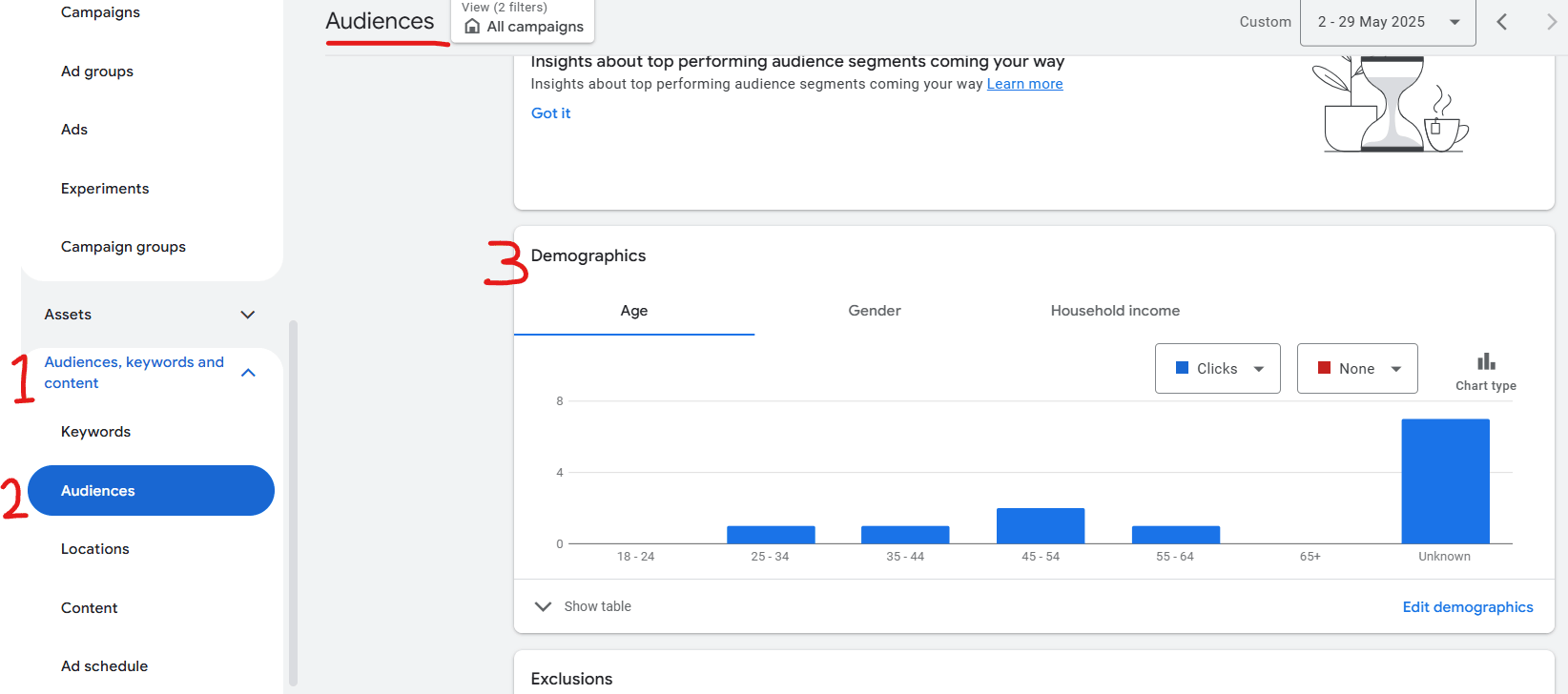
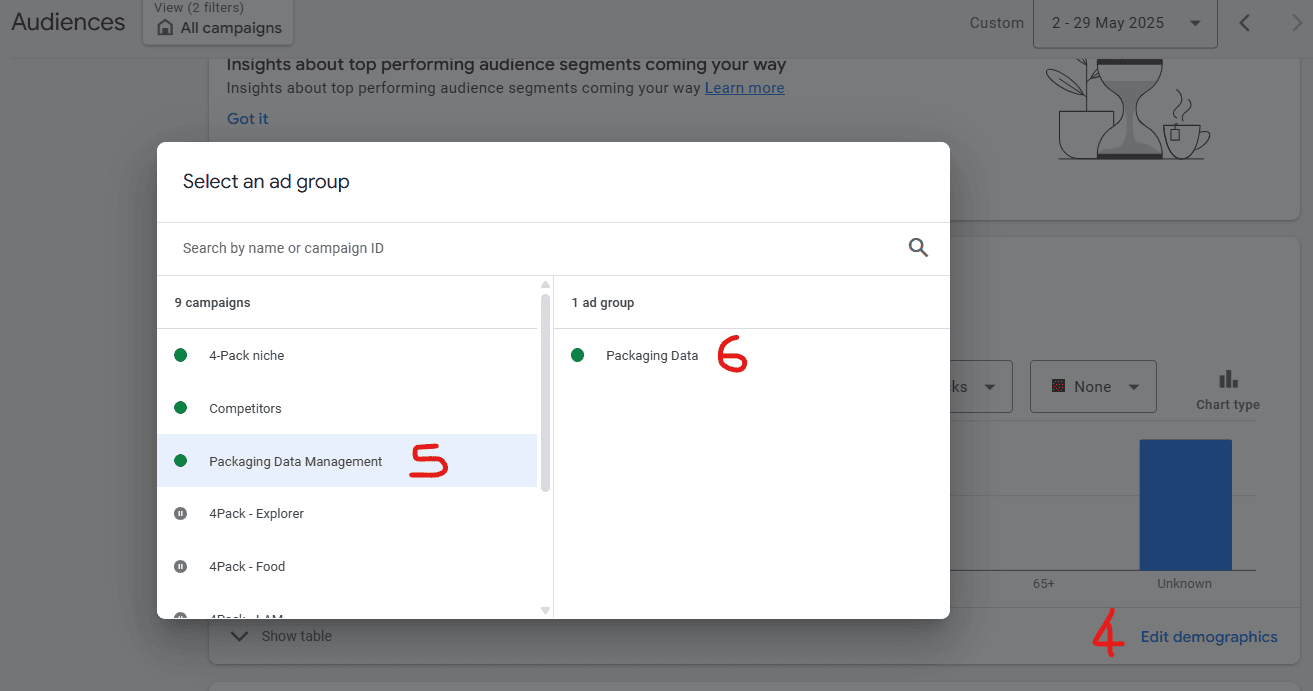
Then click on demographics (4), a campaign name (5) and then an ad group (6):
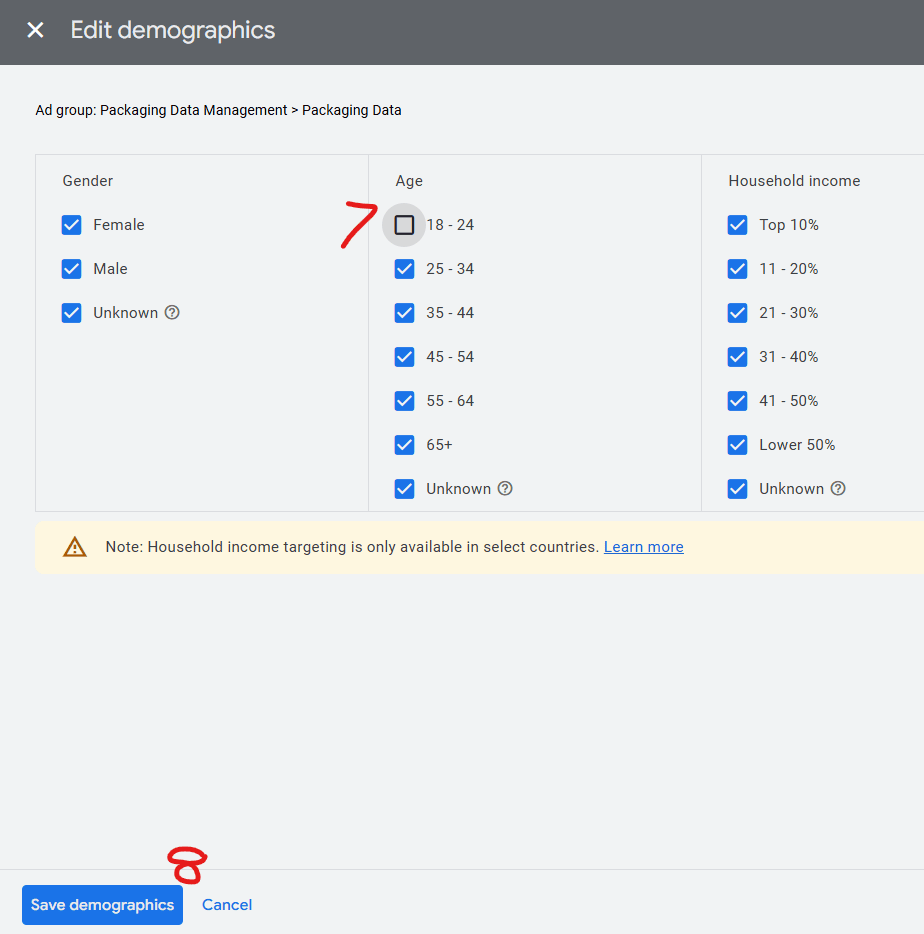
In the example below, the age range 18-24 has been unticked (7), and when followed by Save demographics (8) will save that change for just that one ad group:
You can deselect as many demographics as you want to, but be aware of:
First you need to check if you have an account-level negative keywords list. You would use this for keywords that you never want your ads to be visible under. For example, people who use these keywords as part of their search:
In your Google Ads account, go to Tools (1) – Shared library (2) – Exclusion lists (3). If you have no negative keyword list you will see nothing apart from the option to create one. This example has one set up already (4):
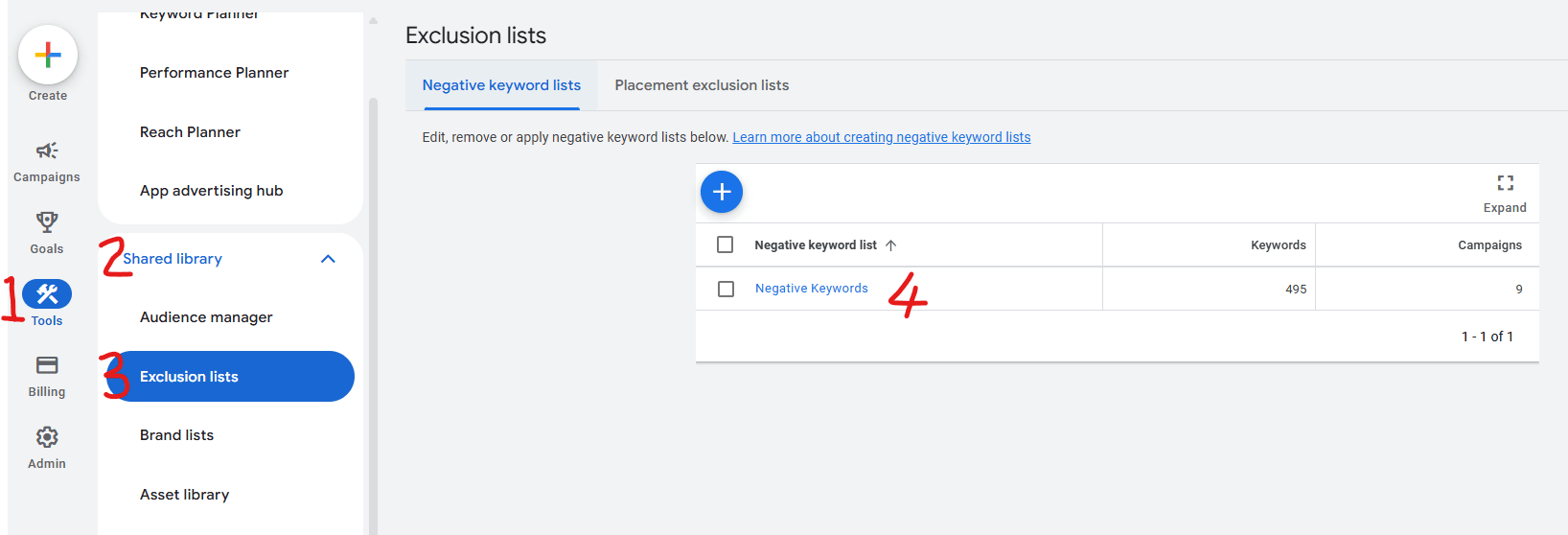
To create a new list, just click on the blue + symbol, give the negative keyword list a name (5), add your negative keywords (6) and then click Save (7):
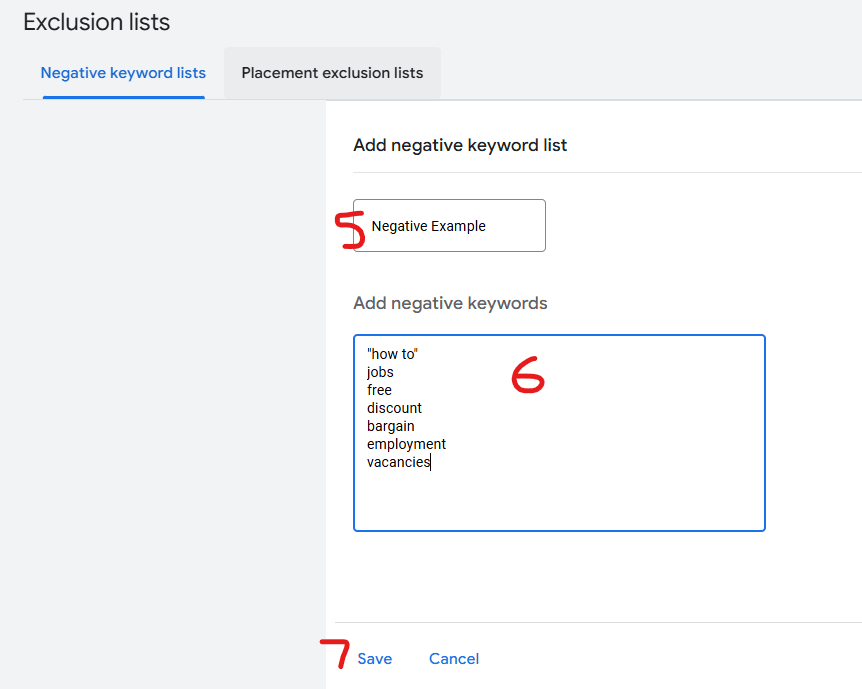
Note in the example above that if there are multi-word phrases, then use quotation marks. In that case, “how to” has been added to avoid people seeing Google Ads if they type “how to” along with any phrase (because they are just looking for free information and unlikely to be potential buyers).
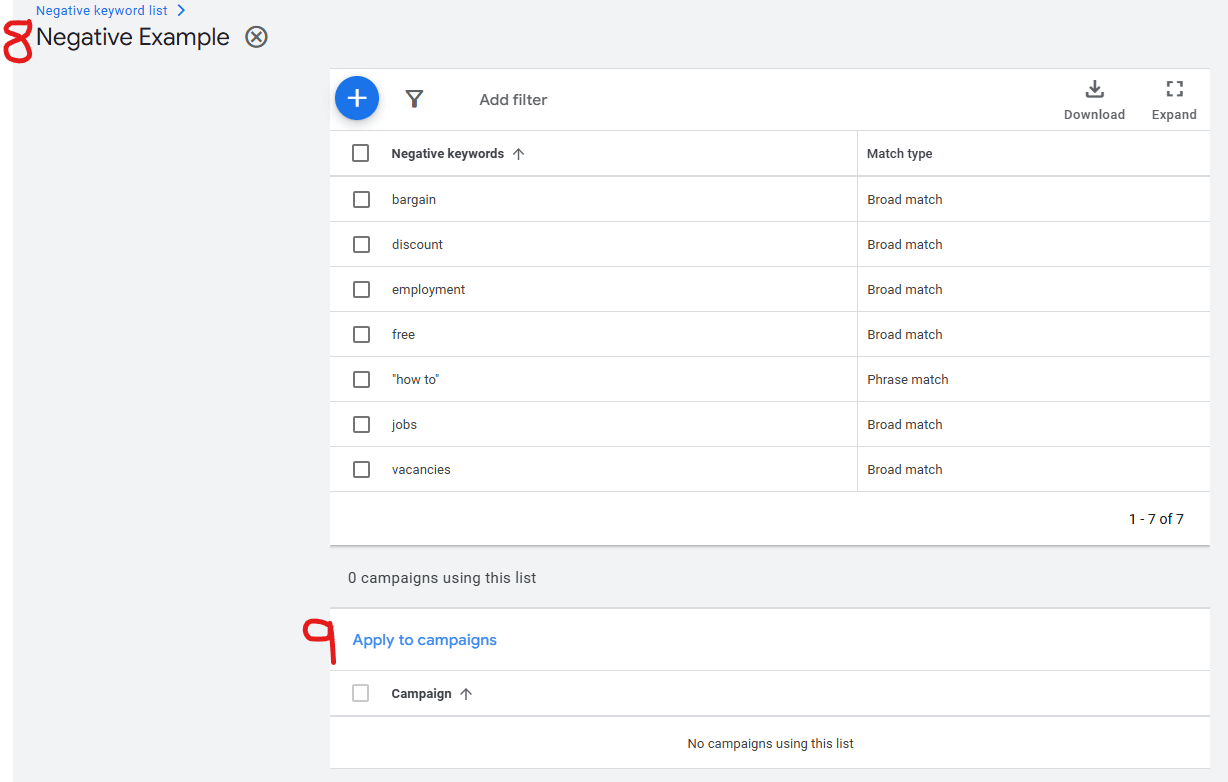
There’s one more step you need – you need to apply that negative keyword list to your campaigns because even though it’s set up as ‘account level’, Google doesn’t automatically apply it to your campaigns.
After saving your list of negative keywords (which you can add to at any time by going into your exclusions lists and editing your negative keyword list) you need to click into your new negative keywords list (8) then click on Apply to campaigns (9) to open up your campaigns that the list could be applied to:
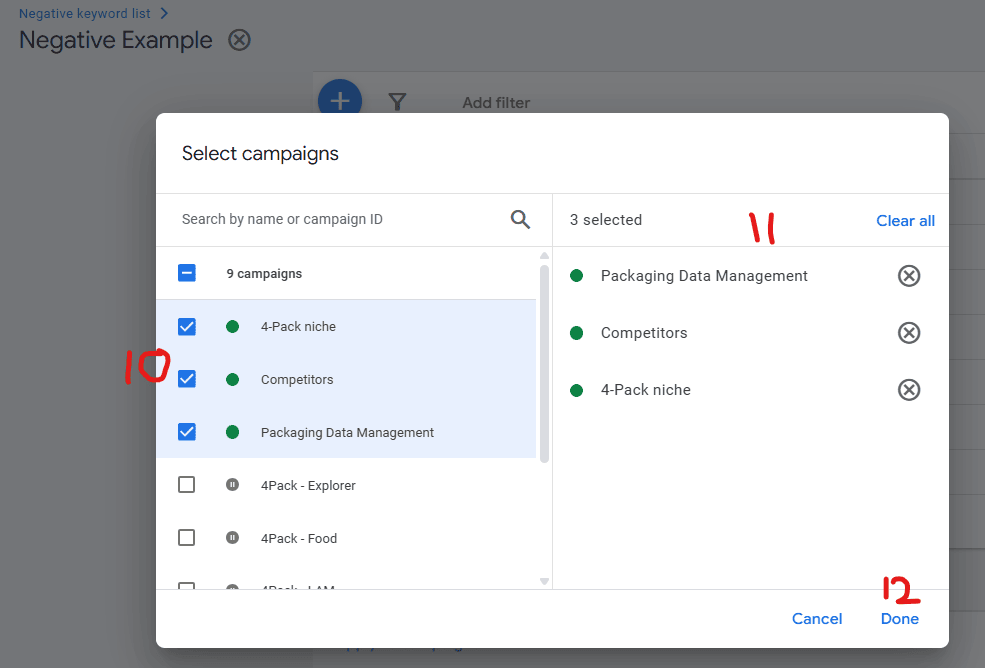
The final step is to tick each of the campaigns that you want the account level negative keywords list applied to (10), which will then show the on the right (11), and then click Done (12) to finish:
By default, Google applies recommendations to your account automatically unless you opt out.
These changes are made quietly in the background and often include things like switching to broad match, increasing your budget, or changing bidding strategies.
Many advertisers don’t even realise this is happening – and wonder why performance has dropped.
While some aspects of Google automation handling such things can work in your favour, many don’t.
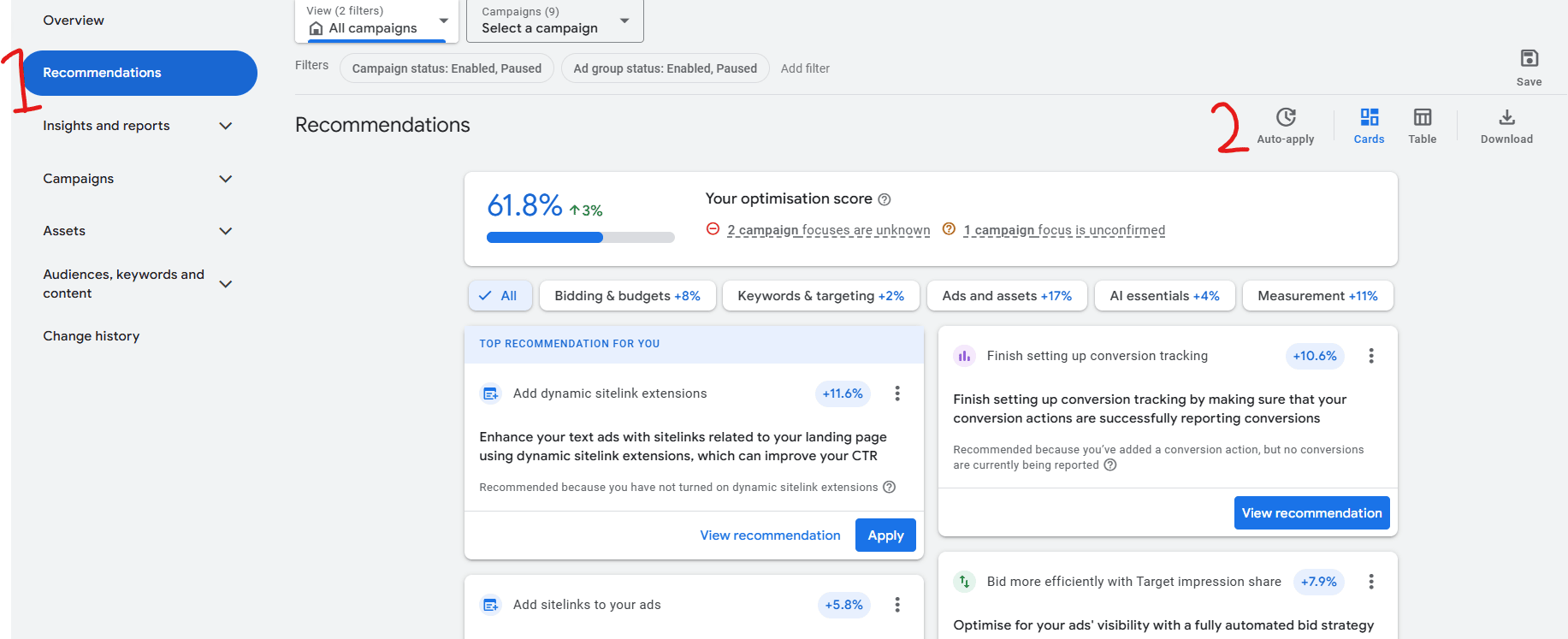
Click on Recommendations in the top left (1), which will show all the recommendations Google have for you. To see which recommendations are auto-applied click on Auto-apply (2):
You will see two sections:
‘Grow your business’ is by far the most dangerous group, so click on that to expand it and see if there are any auto-apply recommendations ticked:
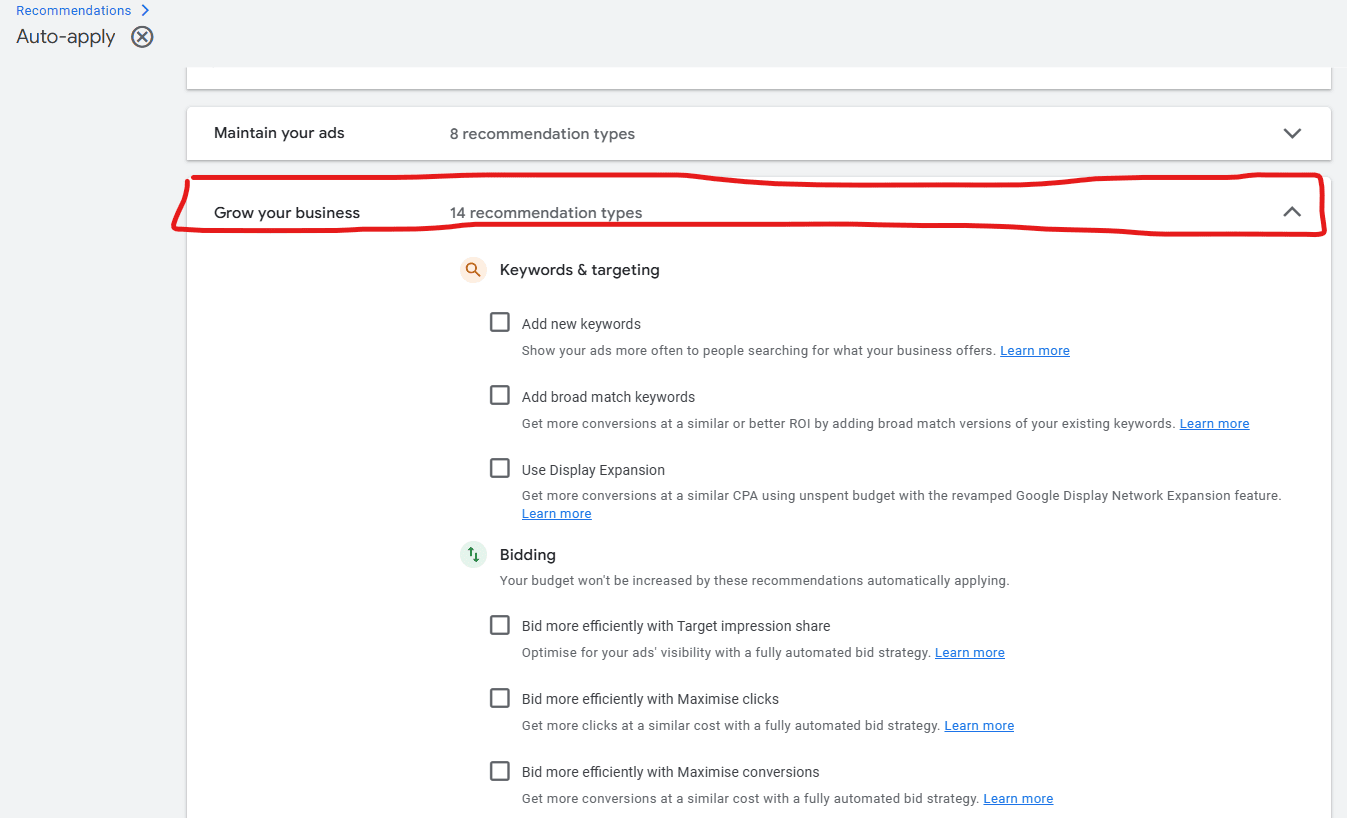
That image above shows that none are ticked, which means that the Google system can’t automatically apply changes to the account.
Some of those options are more dangerous than others, namely the three in the image below, which will:
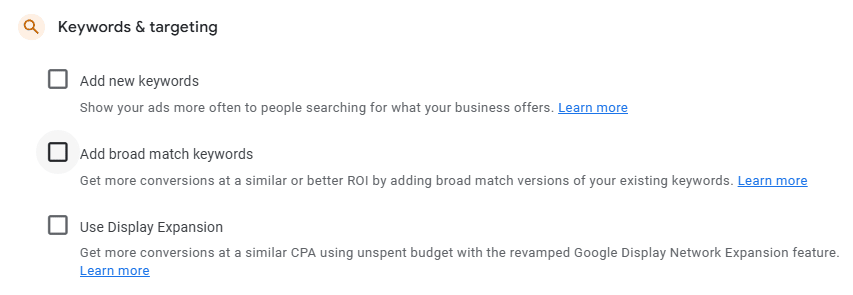
You may want to investigate each of those auto-apply options separately, and will likely discover other website pages warning you against using many of them.
Something also to be aware of are what Google portray as being beneficial on the Recommendations page:
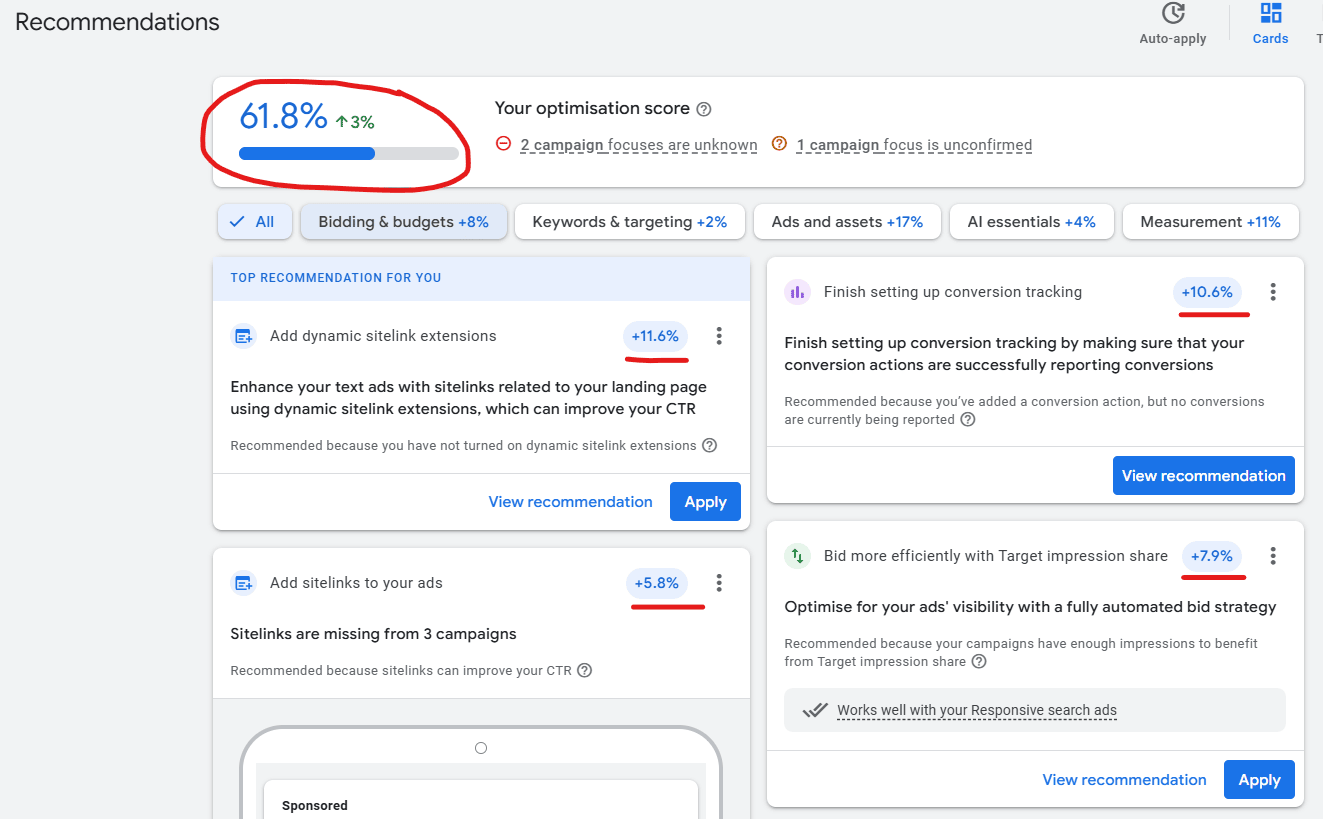
The implication is that if you take those recommendations then you will get towards 100% optimisation.
The truth couldn’t be further away – most will generate more revenue for Google, with no guarantees of increased results for you.
In this example, Google are saying it’s a good thing to have sitelinks, which are links that let people click off to other pages (than the one you want them clicking through to):
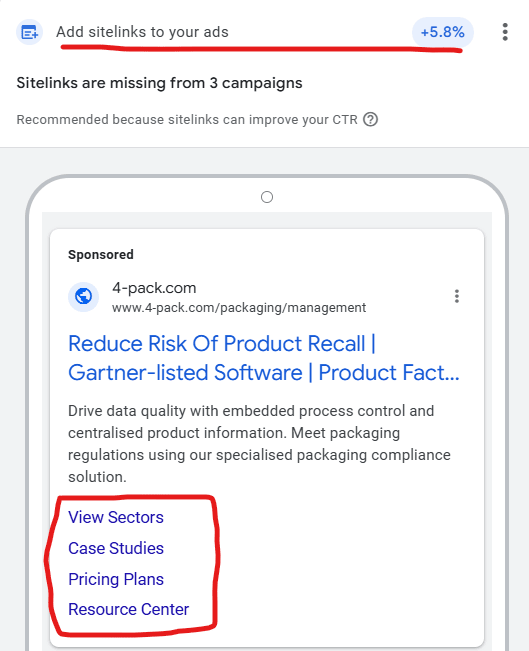
Why would you want people to go to any other page (and pay for the click) than the one you wanted them to?!
Google encourages advertisers to use campaign types like Performance Max or Smart Campaigns.
These automated options sound appealing – particularly to the beginner – but give you very limited visibility into where your budget is being spent.
You can’t easily see which keywords, placements or audience segments are working, which means that lack of control often leads to wasted spend and you having extremely limited ways to measure return on investment.
It’s extremely common for new Google Ads customers to be influenced into these seemingly simple ways to set everything up … and then realise that they have gained little from their spend and automatically thinks Google Ads doesn’t work (when it can work when set up and managed properly).
If your business targets very specific search phrases, you might find they’re flagged as low search volume and your ads won’t run.
Even though someone searching for that phrase is highly likely to be a buyer, Google prefers broader terms that attract more clicks.
This hurts both advertisers and the people searching for something specific.
Going back many years, Google Ads allowed you to create any keyword phrases you wanted to, would allow your adverts to be visible up to 1,000 times, and if your click-through-rate wasn’t strong then they’d penalise you.
Now, if your keyword phrase is considered too specific they slap a ‘Low search volume’ on them, particularly if using phrase or exact match.
In this example, Google are effectively saying: “the keyword ‘aluminium castings manufacturer’ is not important and so we won’t allow you to be that niche”:

In truth, there will be people typing that exact phrase ‘aluminium castings manufacturer’ and those searchers are looking for exactly that.
This means that as an advertiser, you often can’t have visibility for the exact phrases that you want to be visible under, instead having to compromise on phrase or broad match variations (which Google will allow because it allows them to make the advert visible under other phrases – many of which will be off-target and get clicks but not results).
A clever corporation in competition with Google would allow advertisers to completely control what they are and aren’t visible under via their keywords, but it’s extremely unlikely that anyone has the foresight to realise there’s a demand for that.
While Google Analytics gives an overview of traffic from ads, it doesn’t show the full picture.
Ideally, you would be able to see exactly how people interact with your website page by page from your Google Ads clicks, as in this example showing the duration on each website page after clicking through from the ad from the keyword phrase ‘lost wax castings’:
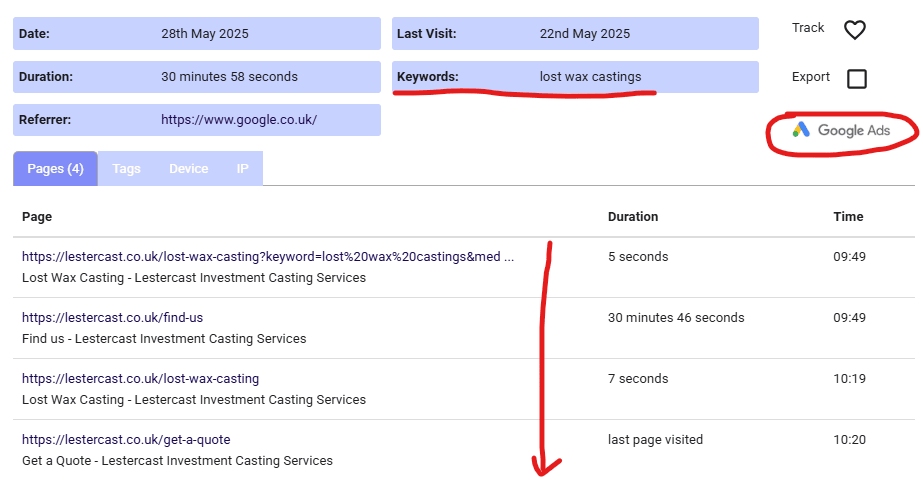
This means that unless you are using software such as that then you don’t have a clear picture of how people are interacting with your website.
Google Ads will show you conversions (if you’ve got them set up) but you’re probably more interested in all those clicks that don’t get to where you want them to, including those that look at one page and no more.
Unfortunately, neither Google Analytics nor Google Ads provide you with that depth of information.
It’s common to see clicks from bots, people who misread the ad (or the ad displayed to them because it was mis-placed by Google not understanding the context of the search phrase).
Google has systems in place to detect invalid clicks, but they don’t catch everything. Many businesses are paying for clicks that never had any chance of converting.
This is especially noticeable in session recordings and page-by-page visitor tracking (see the point above).
Although it has a cost, utilising granular website visitors tracking software will easily recoup costs because it helps to identify weaknesses in the Google Ads visibility, which then leads onto actions that get better results.
Your starting point is to identify keyword phrases that cost you the most budget – and then:
Google encourages advertisers to switch to strategies like maximise conversions or target CPA.
The problem with these is that they rely on having a solid stream of conversion data. For many websites, especially those with low traffic or few online enquiries, these bidding strategies simply don’t work well.
Until enough data builds up, the system guesses – and you end up paying for poor performance because Google is using your budget as a testing ground to see which people convert.
Conversion-based bidding in Google Ads is also flawed in another way – say a ‘conversion’ for you is set up as someone completing your contact form or clicking on an email link or phone number … many of the people who do that are trying to sell you something but Google would still see those interactions as being ‘conversions’ and so make your adverts more visible to the types of people who are going to click on our adverts and then try and sell to you!
Most Google Ads experts recommend to focus on manual clicks initially and, over time, as more data accumulates about your website visitors, consider evolving to conversions-based clicks.
With display and video ads especially, your ads may be shown on irrelevant websites, mobile apps or low-quality YouTube content.
Google doesn’t always make it easy to see where your ads have appeared, and many advertisers don’t spot this until after a lot of budget has been spent.
You can exclude placements, but by then the damage may already be done.
In Google Ads, click on a campaign and then the campaign settings, and then expand Networks. If your view is like this then you are visible on Google only, which ensures that only people actively searching for what you do will see your adverts on Google:
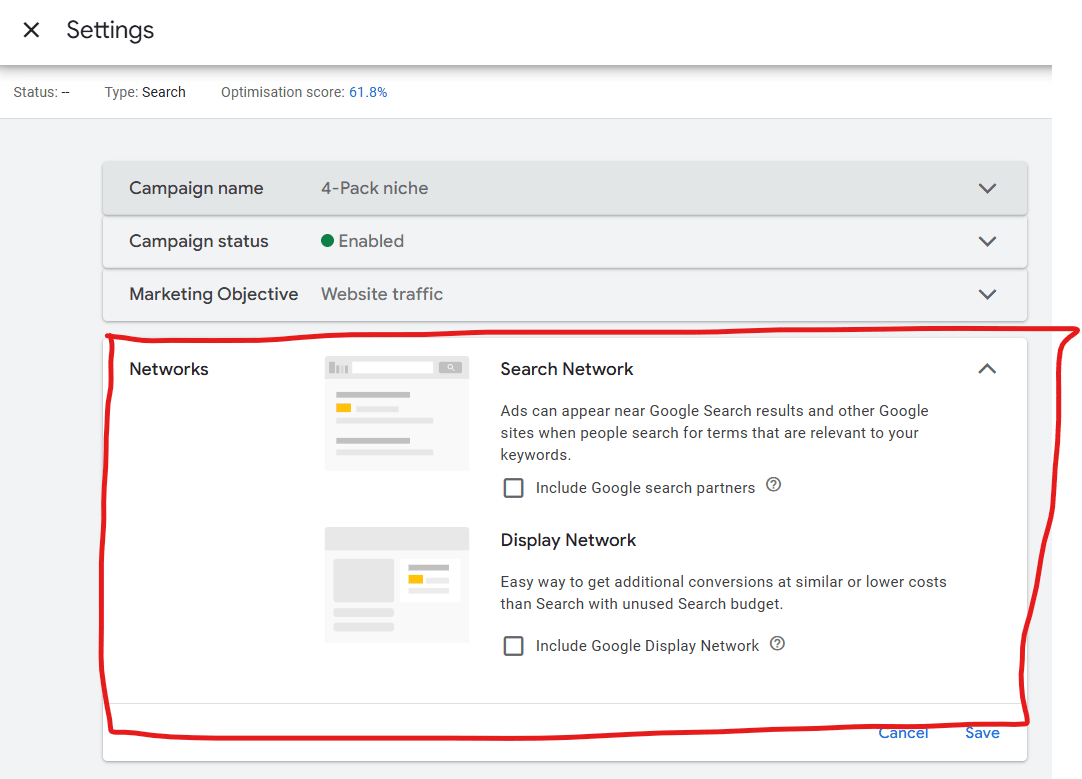
If ‘Include Google Display Network’ is ticked then your ads will be displayed on numerous other websites, supposedly in the right places but in reality you will get a lot of fraudulent clicks (and can prove that via analytics, which will show that the vast majority go no further than the landing page).
If ‘Include Google search partners’ is ticked then your ads will be displayed in slightly better places but outside of Google itself. You’ll have to ask yourself whether you want that or want to focus on clicks from Google searches only.
There is nothing to stop you opening up your visibility over time but it’s recommended to ensure first of all that your Google Ads clicks convert to enquiries via clicks from Google directly.
Google’s account reps will often contact advertisers with offers of help.
That’s a nice way of putting it – constant phone calls, alerts within your Google Ads account, and emails constantly pushing you to get their advice would be another.
The goal of these people is to get you to spend more, not necessarily to get you better results.
I’ve seen SO MANY cases where businesses followed the rep’s advice – such as switching to broad match or automated bidding – and performance got worse.
I’ve also had very strong rows with Google over how poor their recommendations are and when put in writing they go quiet and don’t respond.
I’m not alone in this – see what others say in this reddit post about Google Ads consultants.
Always get a second opinion from an external Google Ads professional before making changes suggested by Google.
IF you decide to take advice from Google and their appointed reps, ensure that you create a full documentation of the actions taken, including ensuring that the call with them is recorded so that you can refer back in detail to the changes made.
Some of their advice may be valid but if, after making such changes, you find that your results from Google Ads hasn’t improved or got worse/more expensive, then you’ll want to refer back to the changes made so they can be undone.
Also worth noting is that Google Ads reps have a three-month period of supporting an advertiser and then it switches to someone else. Typically there’s no proper audit trail of what happened before and you’re just passed to a new person every three months.
Put simply: it doesn’t work.
The big problem is: people often trust brands, including Google, forgetting that they are a huge corporation that is driven by providing shareholders with ongoing increases in revenues and profits.
If you have an opportunity to advertise your business in the form of getting clicks to your website, then Google Ads is at least equal to any of the other platforms available – it will take your money without caring about conversions to business.
If a business had a very low budget for clicks (e.g. £200 per month) then Google (and others) would happily let them spend that on clicks.
At no point do their systems or people look at your website and say: “actually, your landing page stinks and you have little chance of converting such clicks to enquiries.”
They may not have the tech to do that but equally, when signing up for systems such as Google Ads, there is no pre-warning that advises people to really think about what conversions they will get from paid advertising.
How hard would it be to create a comprehensive guide/mini course (Google and others) that gives people the opportunity to strengthen their websites before investing in paid advertising?
Logically it makes sense – people getting clicks to websites that can convert to enquiries well are people who will continue paying for that advertising.
Sadly, whether it’s Google Ads or others, the short-sighted approach is to get sales/clicks budget now and not think about the long-term game.
It can be – if you don’t have the setup, control and tracking in place.
Many of the issues covered here have one thing in common: they benefit Google financially.
The platform is set up to extract as much budget as possible, especially from advertisers who don’t have the knowledge or time to optimise properly. It’s also hard to work out whether a return on investment is gained – and where any problems may be.
That’s not a fair partnership – and it’s why so many businesses feel like Google Ads is a waste of money.
However, when used properly, it can deliver good returns. The key is to understand where your money is going, what’s working, and where you’re losing out.
That’s where I come in.
I help businesses (6,300+ at the last count over the past 24 years):
If you’re using Google Ads and want an honest second opinion, I offer a free call to show where the waste is – and what to do next.
All you’ll need to do is share your Google Ads screen and benefit from the non-sales-pitch recommendations.
Why do I provide that service for free?
Because it’s not only the right thing to do, but some of those calls do lead to clients who would like further support on a small or higher level.