
Your website’s product or service pages are rarely seen in isolation. Visitors compare what you offer against other providers before making a choice. If your pages are weaker, you lose.
This guide shows how to select just one product or service and make that page stronger than all your visible competitors.
You will:
You only need one great product or service page to see the impact, and then you can replicate that strategy to other pages.
Choose one product or service page from your website.
Follow this plan.
Watch what happens.
Choose just one service or product you offer via your website and bring that page up on screen.
This is your page that’s going to change substantially so that you get more enquiries from people visiting that page.
Search Google for the equivalent pages on your competitors websites.
Remember: you are focusing on just one service or product.
List the website URLs in a document (e.g. a Google doc) – each one starting on a new page.
What would a potential customer LIKE on your competitor product or service page, but that’s not been focused on within your own equivalent page?
This isn’t time to be precious or think people wouldn’t care. If something would impress a potential buyer, then it matters.
Just because you think you can provide a better service or product, doesn’t mean the prospect knows that – they are initially only judging you by what they see on the page.
You don’t have to do this alone – if there are others in your business then it’s a great idea to involve them – ideally, sitting alongside you going through the process together.
Take screenshots from competitor pages to paste into your document, and make notes that explain your thoughts about the screenshots, building up a picture of what your competitors are doing well.
Not sure what to look out for? Try these for starters ..
Go through the process for the competitors you know about.
THEN do a Google search for the service/product you’re focusing on.
Go to the websites of any you weren’t aware of before. They’re the competition you didn’t know you had, but are visible in search results (so they matter!).
Keep working on your document that should be building up into many strong elements from all your competitors that sell the same service or product that you do.
What you should end up with is a document that showcases all the strong elements from the product/service pages of your competitors.
Next, it’s time to turn your own product or service page into a combination of all the goodness you’ve identified on your competitors websites.
Years ago I’d have said that you now have to look through your document and move things about so that they’re grouped into actionable tasks.
Nowadays I’d suggest attaching the document to ChatGPT, Gemini, Claude, etc. along with this type of prompt:
These are elements of competitors websites that I’ve identified as being strong from the perspective of a potential customer going to those websites, when comparing to our website page [insert your product or service page url here].
Re-order them so that they are grouped into topic areas that we can focus on, separating into these categories:
1. No or low-cost do soon activities.
2. Spend more time but little money preparing activities.
3. Activities that will take longer or may need some budget/external resources that may involve more cost.
… and see what it produces.
It’s highly likely that there will be no cost for many and little cost for some others.
Then ask the AI to divide the tasks up into time chunks for each weekday (you choose, depending on your availability in the coming weeks).
What you should get is an output to save as a new document that you can then use to diarise in actions to take each day that work towards your service or product page being stronger than all the competitors combined.
Then, just create a calendar entry that repeats each weekday at the same time, referring to the document you’ve just created.
If you take the best of what competitors do with their pages, and combine them into your own updated page, then you’ll be onto a winner.
But why stop there?
What else could you add in that would surpass them all, but answer what’s in the heads of the potential buyers on your product or service page?
Example: if none of your competitors show pricing, lead the way by doing it yourself. Ignore the idiots who say it’s not important or shouldn’t be done. Read my article about pricing if you have any doubts.
Another example: you may see that your competitors mostly have a sprinkling of client case studies/examples related to the service or product. How does that compare to something like this, which shows several client projects and the option to load more into the page?
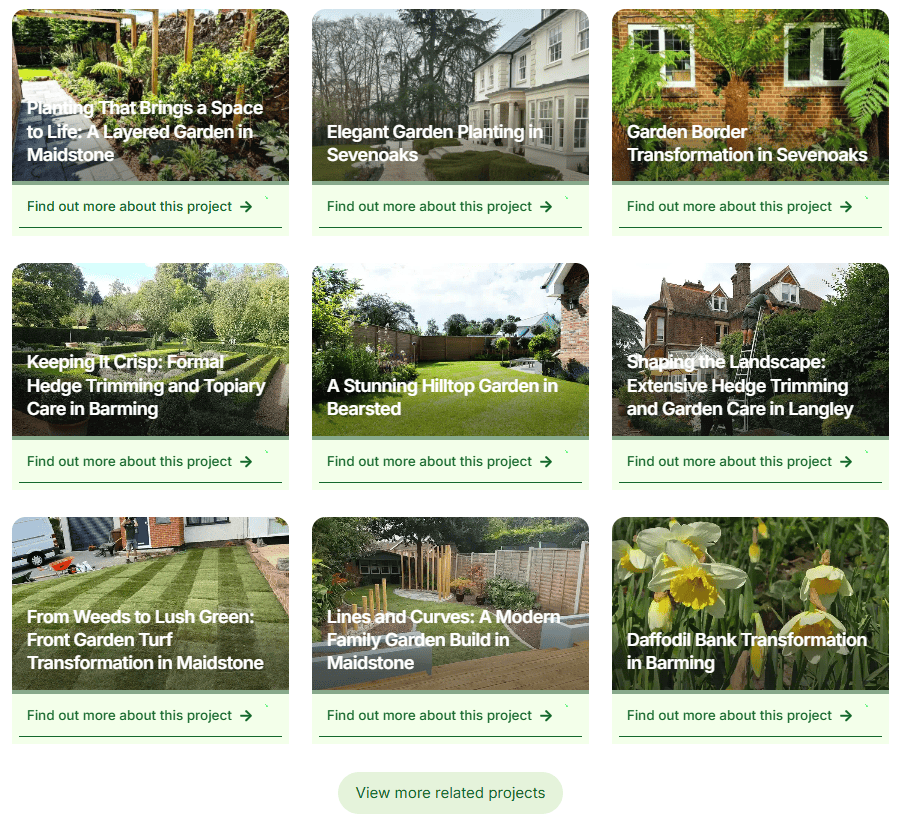
You may even have seen something on a completely unrelated website and think “that would impress potential customers”. For example, a cost calculator.
It’s one thing going through the process of identifying the good parts of your competitors’ equivalent service or product website page.
It’s something else diarising in and sticking to a process of implementing everything needed to beat your competition.
I recommend creating accountability – get several people to set reminders to ask you how the page strengthening is going. It’ll only take a few of those being raised to encourage you to pick up on it again if the actions have taken a temporary back seat.
Lastly, always keep your eyes on the prize:
A service or product page that, when visited by people, contains the best bits from many of the competitors, so that your page shines out in comparison to any other websites your visitors will go to.
Success from website visitors is as simple as that.