
Google Search Console has started to become more useful for anyone trying to understand whether their website is appearing within Google’s AI-generated search results.
If you have access to the new Generative AI report (within Performance), Google can now show you which pages from your website are appearing within AI Overviews and AI Mode, how many impressions they are receiving, which countries those impressions come from and which devices people are using.
There is, however, an important limitation: Google currently does not show you the queries or prompts responsible for those AI appearances.
That sounds restrictive, but it does not make the report useless. Far from it. There is a practical way to combine the new AI data with the information already available elsewhere in Search Console:
In this article I am going to work through that process using a real website and real Search Console data.
The important point throughout is that we are not pretending Search Console tells us more than it actually does. Ordinary Search queries can give us useful clues, but Google does not currently tell us that those particular queries generated the AI impressions.
What it does give us is a very useful starting point for investigation.
Open Google Search Console and look under:
Performance → Generative AI
If the report is available for your website, this gives you a dedicated view of visibility within Google’s generative AI search features. Google currently says this includes AI Overviews and AI Mode.
An impression is recorded when a link to your website is shown to a user within one of these supported generative AI features.
I prefer starting with three months rather than seven or 28 days. AI visibility may still be relatively small for many websites, so the longer period gives you a much better chance of seeing meaningful patterns rather than reacting to a handful of impressions.
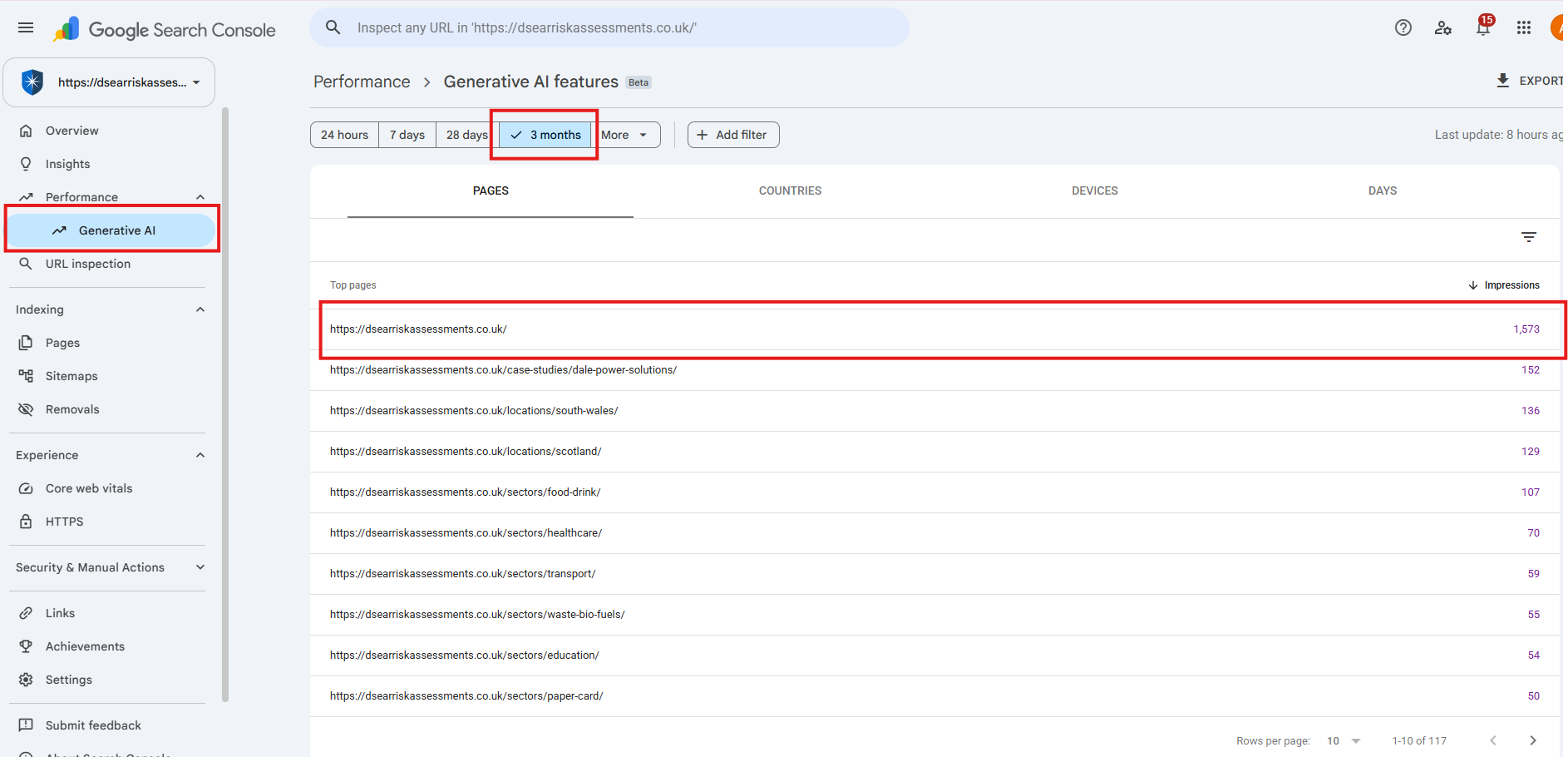
For this worked example I am using the homepage of DSEAR Risk Assessments.
Over the three-month example period, Google recorded 1,573 Generative AI impressions for the homepage.
That immediately tells us something useful. We are not starting by asking, ‘How do I make this website appear in Google AI?’ Google is telling us that this particular page already does appear.
That changes the optimisation question. Instead of trying to manufacture AI visibility from scratch, we can investigate a page Google has already demonstrated some willingness to show.
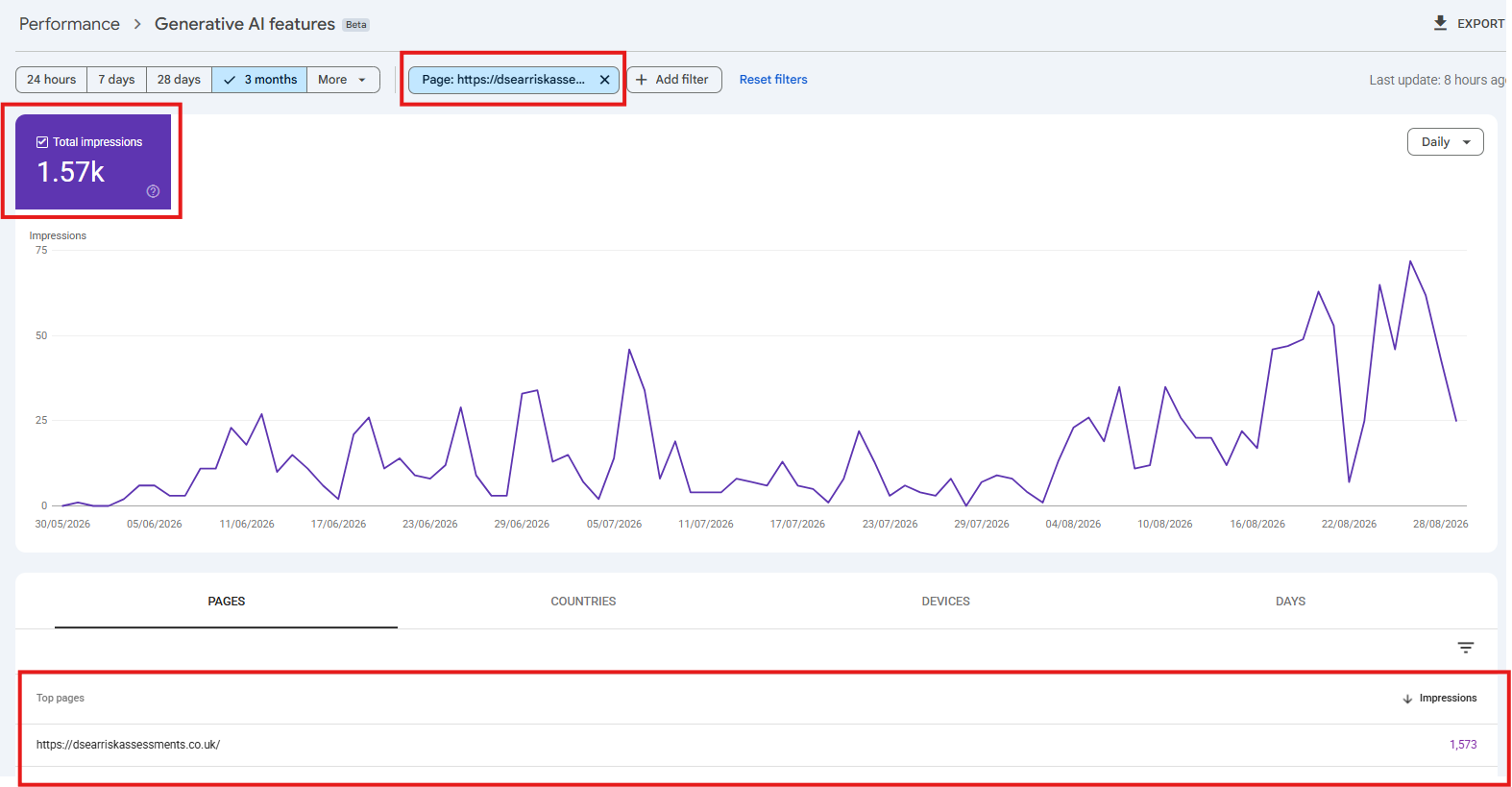
It does not mean 1,573 people visited the website from AI. It also does not necessarily mean 1,573 different people saw it.
It means Google recorded an impression when a link to the page was shown within a supported generative AI Search feature. Google also applies its normal Search Console aggregation rules, so this is a Search visibility metric, not a unique-person metric.
At present the dedicated Generative AI report is more limited than ordinary Search Performance. We can see:
But we cannot currently see the queries that caused those impressions. That is the missing piece we will try to investigate later, and hopefully Google will give to us in the future to make analysis easier.
Before leaving the Generative AI report, look at the Countries and Devices tabs. These are not as exciting as seeing the missing query data would be, but they can still tell you something useful.
For our example, 1,549 of the homepage’s 1,573 AI impressions came from the United Kingdom – 98.5%.
For a UK business offering DSEAR risk assessment services, that is reassuring. Google is not primarily showing the page to an irrelevant international audience.
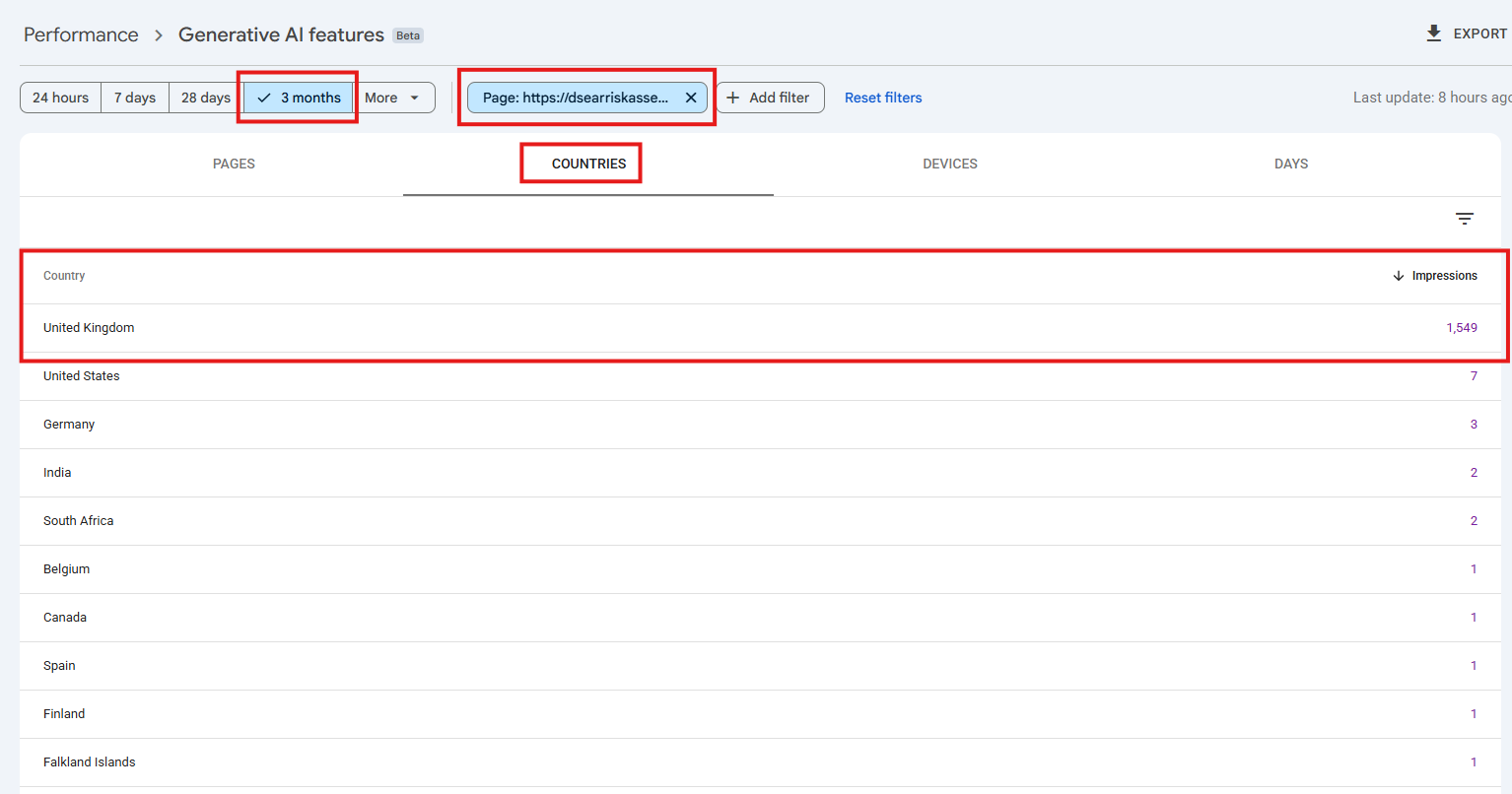
I view country information as useful to know because if you are a UK-focused company that sees most AI impressions are appearing overseas, that would be something worth investigating. Alternatively, if you serve those other countries then that’s also worth digging further into to work out what’s working to make you visible there (and then build on it).
The same report shows:
So approximately 94% of the AI impressions were on desktop.
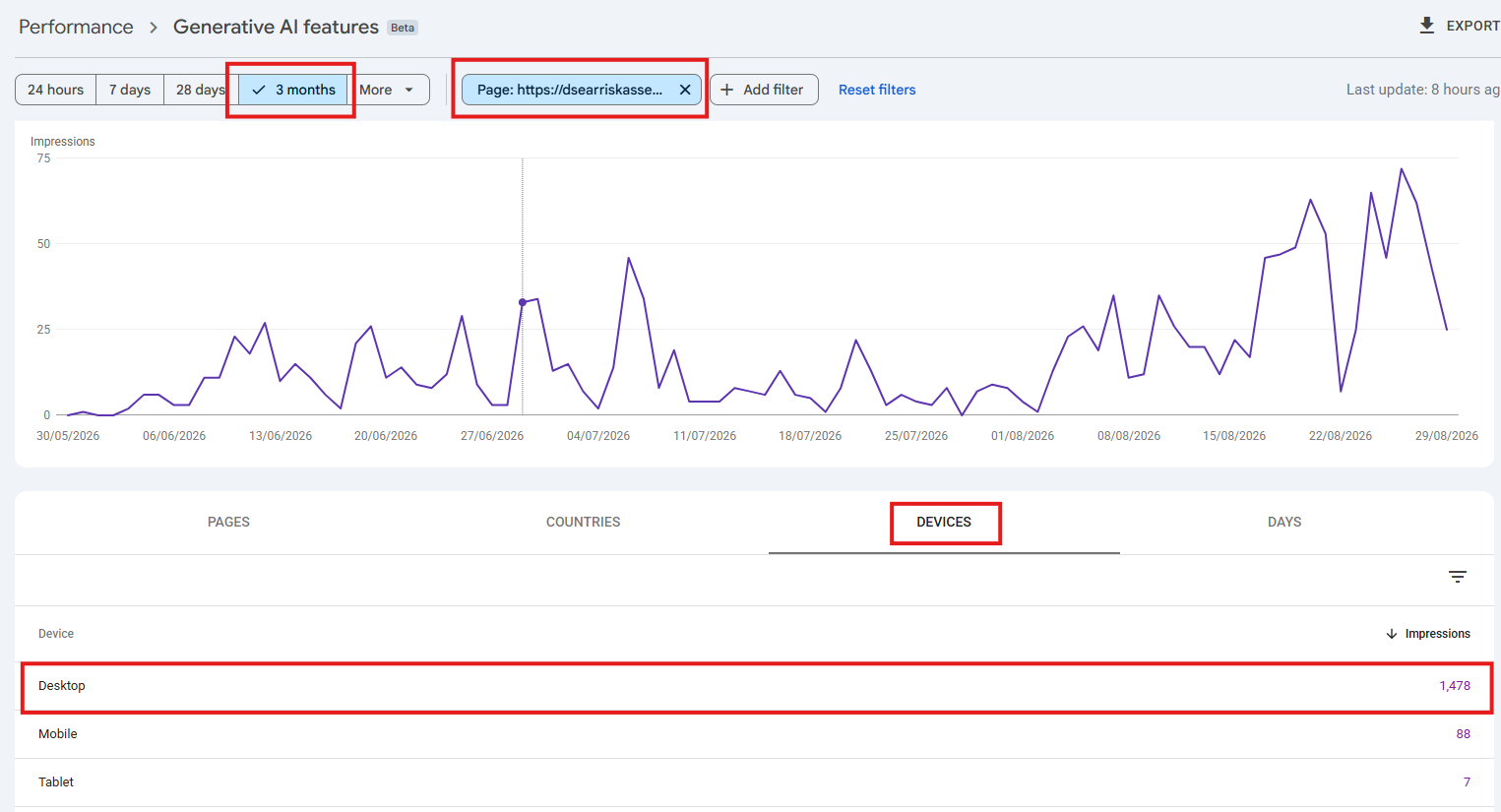
In this case, it’s not that mobile does not matter. It absolutely does. But for this B2B example, the strong desktop bias is useful context. If this pattern persisted, I would pay particular attention to how the detailed technical and commercial content works for someone researching DSEAR services from a desktop computer.
However, if your own data showed a stronger showing of Generative AI visibility on mobile devices, then you’d be focusing a lot more on how your content displays on mobile devices.
This is where the exercise becomes much more useful.
Go back to:
Performance → Search results
Use the same three-month period and filter the report to exactly the same page.
For the DSEAR homepage example I’m using, normal Google Web Search reported:
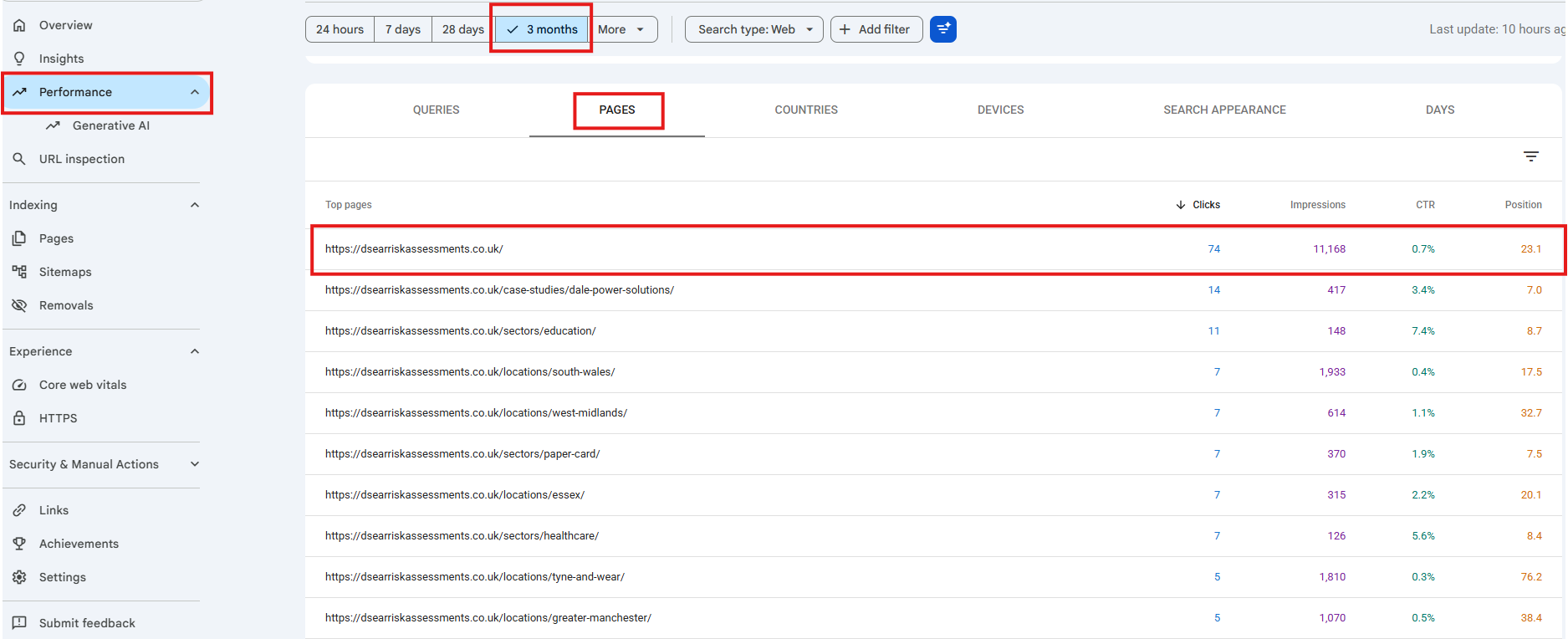
The Generative AI report showed 1,573 impressions.
The important thing to understand is that these are not two separate piles of impressions.
You would not calculate 11,168 + 1,573. Google states that the Generative AI performance data is included within the Web search type in the normal Search Performance report.
In this example, the AI figure is therefore equivalent to roughly 14% of the homepage’s overall Web Search impressions.
That does not mean that 14% of searches were ‘AI searches’. The safer interpretation is that, during this three-month period, Google recorded 11,168 Web Search impressions for the homepage, and 1,573 impressions for the same URL within its dedicated Generative AI reporting.
That is a significant enough proportion to make the AI data worth investigating.
If we were working in ordinary Search Performance, we would now click Queries and see the searches that produced the visibility. But we cannot do that inside the Generative AI report.
There is currently no equivalent AI Queries tab.
Google may tell us: ‘This homepage appeared 1,573 times in AI Overviews and AI Mode.’ But it does not tell us: ‘These are the searches that caused those 1,573 appearances.’
That is an important limitation and one you should not gloss over when reporting on AI visibility.
If a tool or consultant tells you they know precisely which Google queries produced those Search Console Generative AI impressions, I would want to know where that data came from, because Google itself is not currently providing it through this report.
We can now look at the ordinary Queries tab for the same URL.
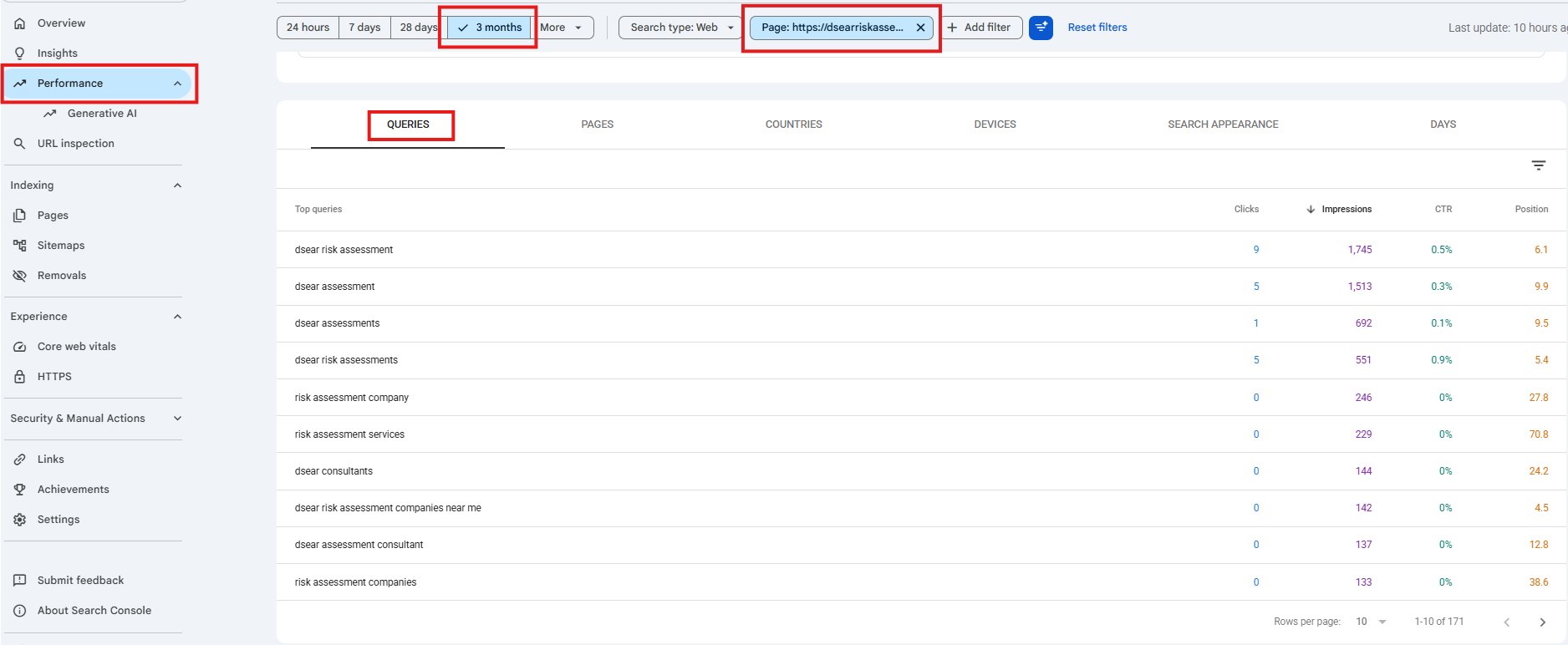
Remember: these are not the Generative AI queries.
They are search queries for which Google has shown this homepage in normal Web Search during the same period. But they tell us a great deal about how Google already understands the page.
So what can we legitimately infer? We know Google strongly associates this homepage with DSEAR risk assessments. We also know it associates the page with several different types of intent:
That is enough to give us sensible searches to investigate manually.
Now comes the investigative part. Take some of those ordinary search queries and actually search Google.
You are trying to answer two questions:
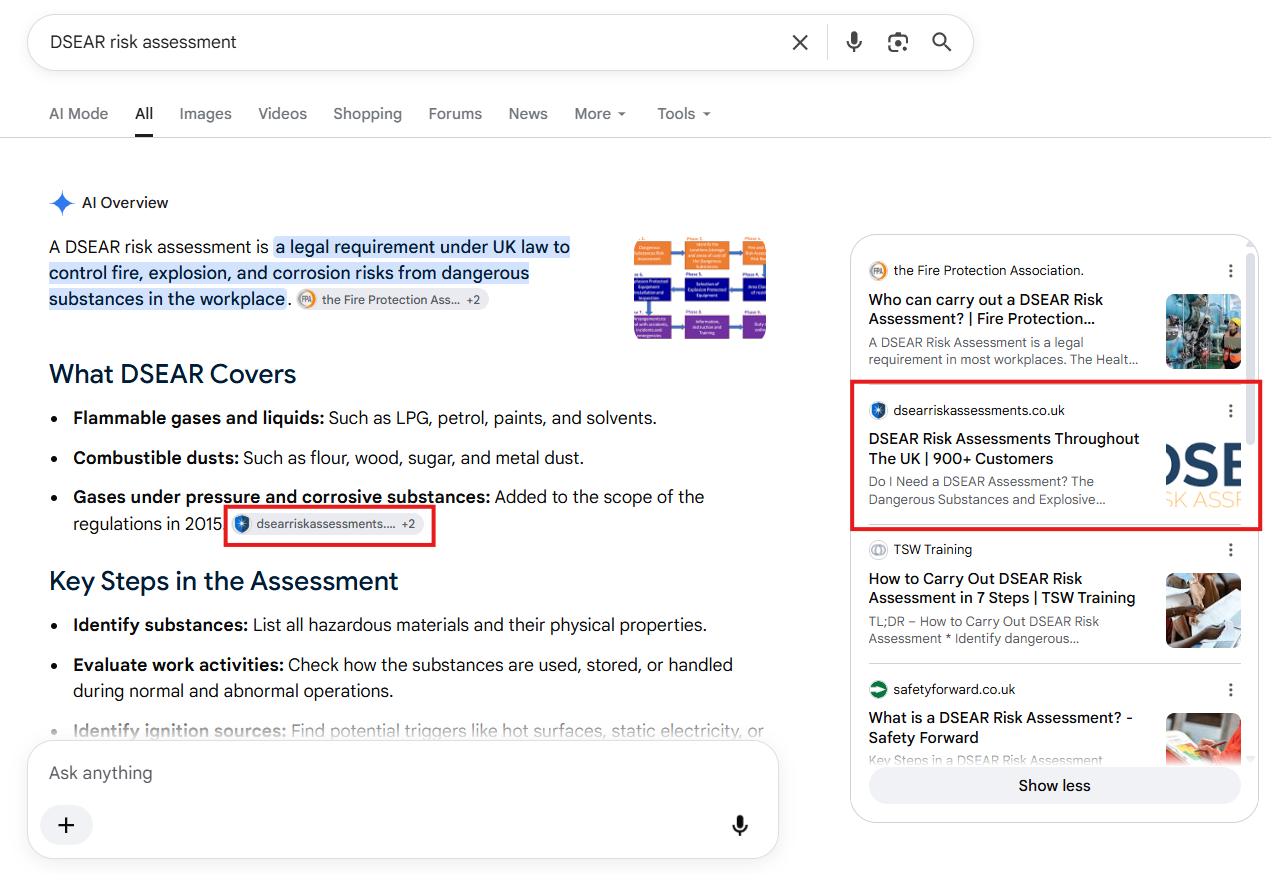
Using my DSEAR risk assessment data as an example, I can see that the most important and highest searched-for page gets the desired result within the AI Overview:
However, via a manual search I can see that a more niche phrase of ‘who can carry out a DSEAR risk assessment’ is not showing the home page or any other page in the AI overview, so that gives incentive to create a page/content that answers that specific question:
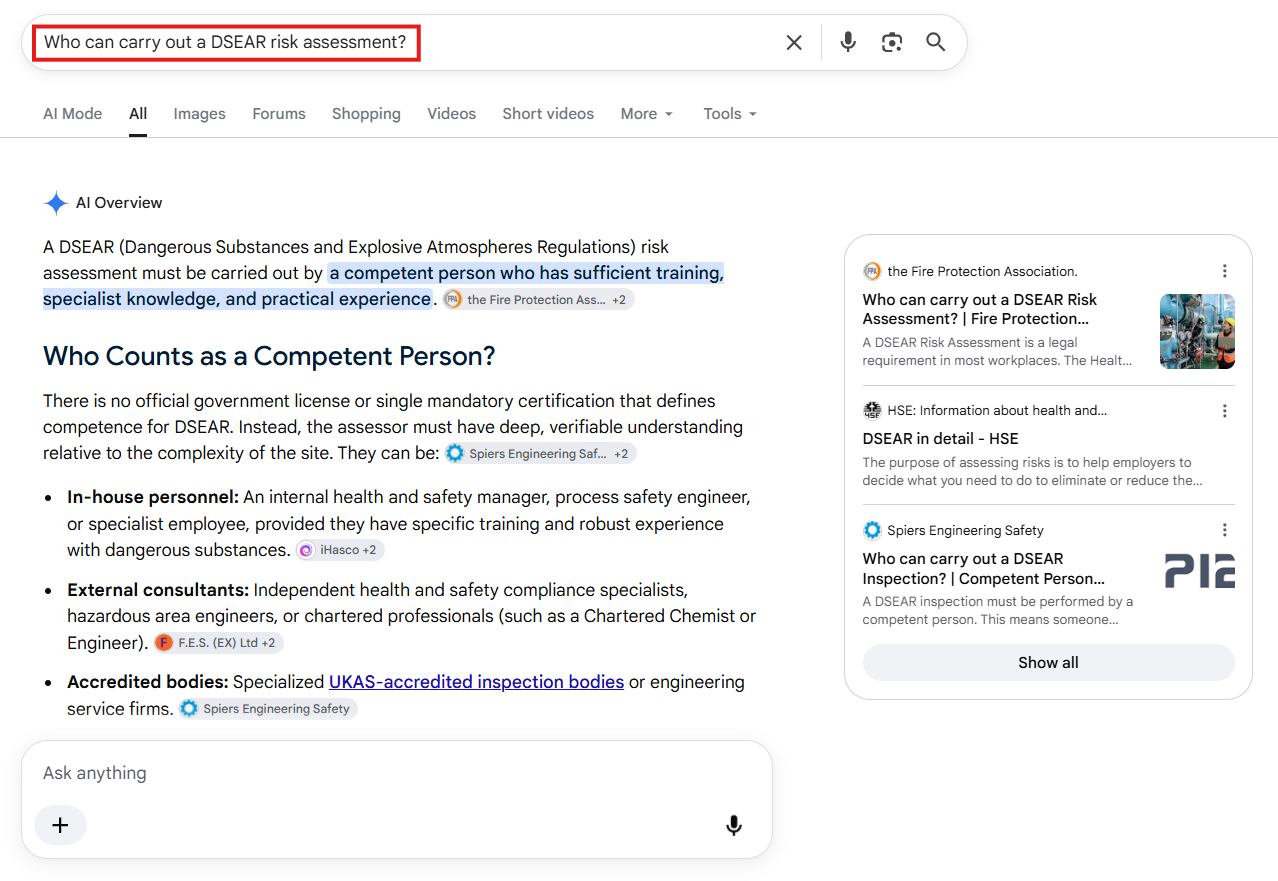
A manual search today does not prove that this query was responsible for the historical Search Console AI impressions. AI results can change and can vary depending on the query, location and Google’s systems at that moment.
We are using these searches to investigate the subject area, not pretending we have reverse-engineered Search Console’s missing query data.
For each search phrase you type into Google, assess:
The objective is not simply to get screenshots showing that your website appears in AI. The more useful question to ask yourself is:
What can this data tell us about what we should improve next?
Suppose, from our example, we discover that Google frequently generates AI answers around ‘Who can undertake a DSEAR risk assessment?’ If we don’t have a page that explains competence, qualifications, experience or the assessment process, that is an obvious area to strengthen.
Another example: if ‘How much does a DSEAR risk assessment cost?’ regularly produces an AI Overview, but the website avoids talking about price altogether, there may be an opportunity for a genuinely useful section explaining what determines cost.
The intention is not for you to copy Google’s AI Overview. It is to ask:
Does our page deserve to be one of the sources Google uses to answer this question?
And if not, what genuinely useful information is missing?
There is another reason not to treat the normal Search queries as a simple keyword checklist.
Google explains that AI Overviews and AI Mode can use query fan-out: one user question can lead Google’s systems to perform multiple related searches across different subtopics and sources while constructing an answer.
So simply repeating a phrase such as ‘DSEAR risk assessment cost’ another eight times is not a sensible AI optimisation strategy.
A better approach is to make the page genuinely stronger around the overall subject:
Google’s own guidance is that the normal fundamentals of good SEO continue to apply to AI Overviews and AI Mode; there is no special piece of ‘AI schema’ or secret GEO file required simply to appear.
This should not be a one-off exercise.
If you identify a page with meaningful Generative AI impressions and then substantially improve it, return to Search Console over the following months and look at:
We still will not have perfect attribution. But we are no longer guessing completely.
Google Search Console is now giving us direct first-party evidence that particular pages on our own websites are being displayed within Google’s own AI search experiences. That is a useful signal.
This information is correct as at September 2026.
| Search Console can tell you | Search Console currently cannot tell you |
| Whether your site receives Generative AI impressions | The exact AI queries or prompts |
| Which pages appeared | Why Google selected a particular page |
| AI impressions by page | The exact AI answer in which every impression occurred |
| Countries | A conventional ranking position for the AI appearance |
| Devices | Which normal Search queries caused the AI impressions |
| Trends over time | A complete recipe for improving AI visibility |
Google’s Generative AI report is not a complete AI SEO reporting system.
But it gives us something we did not have before: first-party Google data showing which pages on our own websites are actually appearing in AI Overviews and AI Mode.
Find the pages Google AI already shows → understand their normal search footprint → investigate relevant searches manually → identify gaps → improve the content → monitor what happens.
That is much more useful than randomly asking an AI tool or Google a handful of questions and deciding from those results whether your website has ‘good AI visibility’.