
Most websites do a reasonable job by offering at least three basic contact options:
… although many don’t do a brilliant job of those.
Those three also aren’t enough if you want to maximise enquiries.
When you also include a physical address and live chat, you significantly increase the chances that a potential customer will reach out.
Visitors to your website each have their own communication preferences and they will each be at different parts of their buying journeys:
Those that are researching or investigating in more depth may not yet be at the point of trusting you.
They also don’t want to end up on a database of sales prospects, which could happen if you knew their email or phone number.
This is where live chat is really important because it allows people to have dialogue without necessarily providing their contact details (unless you’ve made the big mistake of insisting live chat users have to supply that information).
It’s a ‘safe’ way for them to find out more and feel like they can’t be sold to via their own contact details.
There may of course be people who have no problem with sharing their details with you via email, contact form or phone … but many people are more cautious, so it’s important to allow for all types.
When people ARE more ready to engage with you, they may have a preferred contact method to use.
Some people use email so that they’ve got an audit trail of the dialogue, whereas others may be content with using a contact form, even though they may not get a copy of that form emailed back to them for their records.
And then there are the people who will just pick up the phone.
Because we are all different in our preferences, it’s important to have a range of options that people can choose from.
Each of these forms of contact are important to get right within your website – you can click to jump to each section:
We all know that bigger businesses avoid showing phone numbers, but for those of us (the majority) who are normal everyday businesses, a phone number is important and should be displayed within all of:
This ensures that wherever people are looking within your website, it’s always easy to find the phone number (and people often ring up, referring to content from the website page they’re currently viewing).
Optionally you may include it within the body of pages in appropriate places.
Tip: if you make your top navigation area sticky (so that it stays in place as people scroll through your website) then your telephone number will always be easy for them to refer to.
In some cases it’s acceptable to have only a mobile number within your website.
For example, you may be a one-person business that always has your mobile to hand and can answer it.
Or the nature of your service may be highly personal and potential customers want to feel they’re sharing with only you. For example, a therapist or coach.
If you have a mobile number only, what happens if you are busy and can’t answer it? There are a few possible outcomes:
Similar principles can apply to a landline – it’s one thing having a number but if it’s not answered promptly then you will lose potential business.
When people see a landline on a website they get the impression that the business is larger than one person. That’s not always the case but there is an expectation that someone will be taking those landline calls whether directly or via a call answering service. Expecting people to leave a voicemail on an unanswered landline call though is not going to get results.
And … if you include no phone number at all then you are sending out these messages:
The email address should be visible on both your contact page and also within other pages – typically in the navigation bar or the footer (and sometimes both). This makes it easy for people to email from wherever they are in your website.
Many people want to make contact via email, so that they:
Some businesses don’t provide an email address because they want to avoid spam, thinking that a contact form will be enough. But that doesn’t allow for what the website visitor wants.
To get round the issue of spammers using the email address, use a dedicated email address for enquiries (e.g. hello@yourbusiness.com), which helps to protect the main email address that you may use to communicate with people (e.g. yourname@yourbusiness.com).
You will of course still get spam email but you won’t miss any important enquiries if you:
Although more common with micro businesses, using a generic email (e.g. name@gmail.com) on a website doesn’t create a good impression when it’s so low cost to have an email linked to your proper company name/domain.
It’s fairly common to think that having either a contact form or an email address is enough. It’s not.
You need both – mainly because people like that choice.
Contact forms can:
Website contact forms are normally on the contact page but they can also be included in the page footer and also at other points within website pages.
You can also have separate contact forms for different types of enquiries and have those enquiries directed to different people within your business, depending on which variation of form was completed.
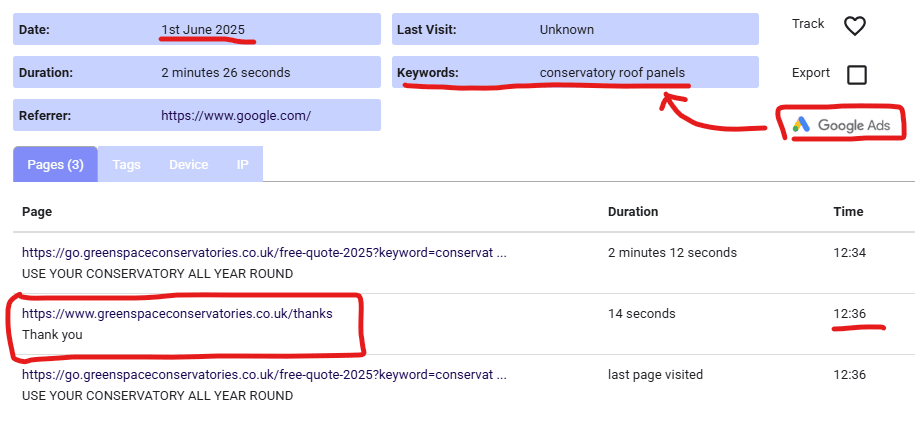
Contact forms can also make it very easy for you to track what led to the enquiry – if you’ve got them set up so that a ‘thank-you’ type URL page gets triggered after people have submitted that form.
Here’s an example of a contact form that was completed and, because the form triggered that thanks URL (on 1st June at 12:36) it was easy to link that enquiry back to the source (the keyword ‘conservatory roof panels’ from Google Ads):
A contact form also gives you the opportunity to provide a reassuring message on the ‘thanks’ page people see after submitting the form. For example:
Thank you for your enquiry – we will respond to you within a maximum of one working day.
Such messaging tells the enquirer that their message has been received from your contact form, but with email (unless the company has an autoresponder set up) people may have doubts about whether their email got through.
Most businesses operating from a physical location would have their address within their website – both on the contact page and also in the footer of each page.
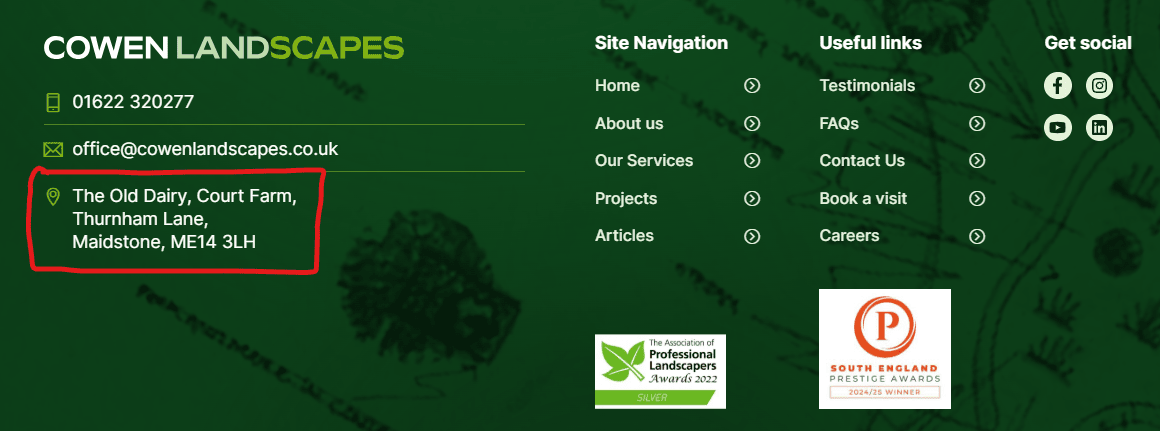
A physical address creates assurance that the business is real, which is particularly important when expecting people to buy something online, but also people like to know that the business has a physical presence.
Including the business address within the website is also important to show Google/search engines that the business is real. It should also be the same as displayed on your Google business profile page.
This isn’t so easy for smaller businesses, including those who work from home and may not want people to know where they live – so a business/cost decision needs to be made …
Do I invest in a virtual business address?
A virtual business address is a physical location that is associated with the business and can be simple (just an address) or more involved (e.g. takes post and provides other services).
Costs vary but are typically from £25-50 per month.
Some businesses use their accountants address as their registered address, which also goes on their website. That’s OK but you will always get people who look that up, realise that’s the position and think you’re too small to have your own business address.
At least with a proper virtual business address it’s feasible that you work there, although there are exceptions, of which this is one:
71-75 Shelton Street
If you type that into Google you’ll see that numerous businesses are registered there and it’s blatantly a virtual address.
Whether this matters depends on how you think your prospects will feel if they see that. I have a client that had used that address but they were selling a premium service to discerning clients and it just didn’t portray the best message. Thankfully, they have now changed that.
Live chat is something that’s so easy to get wrong.
I cover this topic in much detail on the page https://websuccessinsights.com/knowledge-hub/using-live-chat-to-avoid-you-losing-potential-business-to-competitors/ but in summary here …
Many people don’t want to be fully visible and so won’t email, use contact forms, or phone.
This will be for a range of reasons, including:
For all those reasons, live chat provides an opportunity for you to get some form of engagement with potential customers without them feeling as if they have to identify themselves at this point.
However, there is a caveat – live chat forms that insist on people providing their contact details completely defeat the point of the being anonymous. It happens a lot and kills the potential to build trust with a website visitor.
If starting out, options like Tawk.to are completely free and very flexible.
There may also be chat functionality built into other tech you may be using (e.g. your CRM) and what each business needs in the way of functionality will be very individual.
In my view, there’s only one scenario where live chat doesn’t work: a one-person business where they aren’t likely able to instantly respond to people on live chat.
All other arguments against live chat are addressed in more detail on the page I link to above.
We’ve all experienced this – chat bots that are totally inadequate and make it really hard to get what we want. The bigger the organisation, the worse the chat bots get.
Although chat bots can sometimes provide the information that someone wants, most of the time we end up wanting to engage with a human who can help in more depth. We want to be able to type something like ‘speak to human’ and it understand that we need to be connected to someone.
But so many chat bots fail on that point – often intentionally (they think it’s acceptable to make people self-serve on everything and not get people involved).
It’s also clear that most companies don’t have a process of analysing all the chats that people have had, so that they can improve how their chat bots work. With AI being able to do such analysis, there’s really no excuse.
Ideally, a chat bot would start off with an introduction similar to this:
Hi – I’m a chat bot and can answer many questions – but at any time you would like to be connected with a real human, just type: speak to human, and I’ll connect you.
That gives people the option to find answers themselves or spend a bit longer by being connected to a real person.
Chat bots have their uses but from a human perspective, the best solution is to make it really clear that it’s a real human who is going to respond to live chat.
The best examples I’ve seen have included a picture of the person available and messaging similar to:
Yes, I’m a real person ready to live chat with you!
People want answers quickly and they don’t want to be digging around websites to find the answers.
Just like AI search results make it easy for people to narrow in on options that could be good for them, live chat adds value to websites when it effectively says: let’s have an anonymous chat in this safe online space, and if you like what we discuss then maybe you’d like to go further.
Websites that don’t offer that flexibility will lose out to competitors that do.