
Keeping a record of significant changes made to your website can make it much easier to understand why its performance improves, declines or behaves unexpectedly.
A website changes log is simply a chronological record of important changes made to your site: new pages published, existing pages edited, plugins installed, tracking altered, redirects introduced, navigation changed, technical work completed and anything else that could potentially affect your traffic, search visibility, website functionality or enquiries.
That record becomes particularly valuable weeks or months later. If Google Analytics suddenly appears to stop recording traffic correctly, for example, your log might show that a cookie consent plugin was changed two days earlier. If a page starts receiving considerably more visibility in Google Search, you can look back and see exactly when you rewrote it, added internal links or created supporting content.
It is also a useful way of making sure that website work is actually reviewed. Instead of publishing an article and forgetting about it, you can record when it was published, set a future review date and then return to Google Search Console to see whether it is being indexed, appearing for the searches you expected and attracting traffic.
You don’t need complicated software to do this. I use a spreadsheet to maintain a running record of significant website changes. The important part isn’t the technology: it’s having one reliable place where you can see what changed, when it changed and, where appropriate, what happened afterwards.
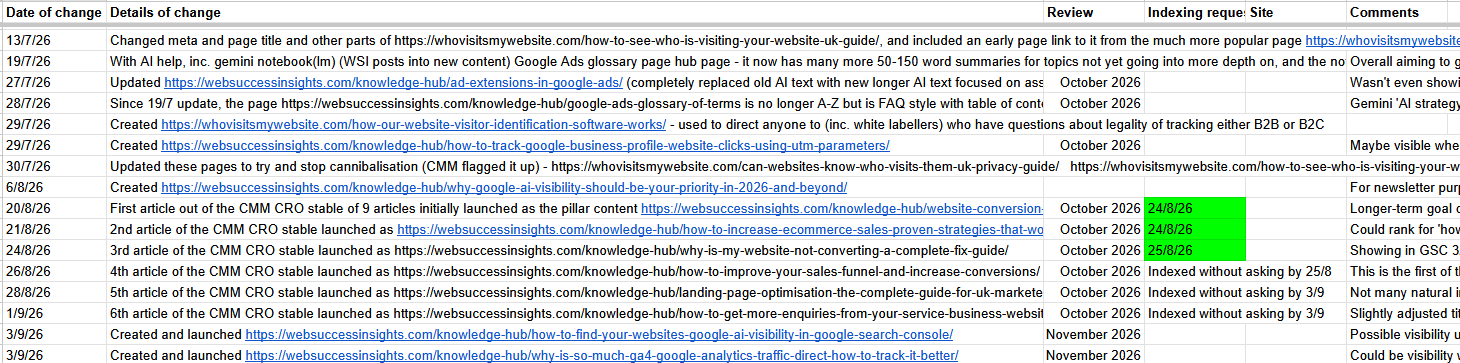
A website changes log is a chronological record of significant changes made to a website.
That might include changes made by:
It doesn’t need to record every tiny alteration.
If somebody corrects a spelling mistake or swaps an image for a slightly better version, there may be little benefit in recording it.
The changes worth logging are primarily those which could potentially affect:
There are WordPress plugins and other tools that can automatically record user activity, but that isn’t quite the same thing.
A useful website changes log records the business context behind a change too.
For example:
30/7/26 – Updated these pages to try and stop cannibalisation – https://whovisitsmywebsite.com/can-websites-know-who-visits-them-uk-privacy-guide/ https://whovisitsmywebsite.com/how-to-see-who-is-visiting-your-website-uk-guide/ https://whovisitsmywebsite.com/can-i-see-who-visited-my-wix-website/
That tells you considerably more than an automated system simply recording that somebody edited a page at 10:43am.
The biggest benefit is that it gives you a timeline.
When something unusual happens to a website, one of the first questions you will often want to answer is:
What changed shortly before this happened?
Without a website changes log, answering that question can involve searching through emails, asking developers what they remember doing months ago or simply guessing.
With a website changes log, you have somewhere to start.
Imagine you look at Google Analytics and notice that recorded website traffic dropped dramatically from a particular date.
There are numerous possible explanations.
It could genuinely mean fewer people are visiting the site.
Alternatively, something may have changed in the way those visitors are being measured.
You can now look at your website changes log.
Perhaps you discover that two days before the apparent traffic drop:
That doesn’t automatically prove that one of those changes caused the problem.
But it gives you a very useful lead.
The same principle applies to many other problems.
You might notice that:
Instead of trying to remember everything that happened around that time, you have a dated record to investigate.
Here’s a real example of a business that contacted me because they had noticed their traffic dive down from late February:
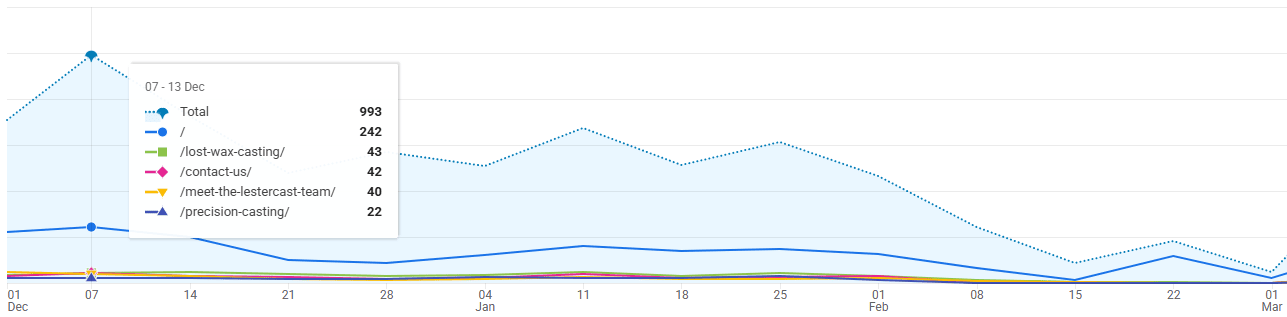
Unfortunately, they DIDN’T have a website changes log and it took a lot of time and digging to work out that it related to a plugin they’d installed that had conflicted.
Now they keep a website changes log, having gone through that pain!
SEO work often doesn’t produce an immediate, obvious result.
You might substantially improve an important page today by:
Then you move on to something else.
Several weeks later that page starts appearing for more Google searches.
Without a record, you may vaguely remember improving it but not exactly when, or precisely what you changed.
A website changes log gives you that history.
You can compare the date of the work with what subsequently happened in Google Search Console.
For example …
Before the change:
After the change:
That allows you to make much more informed judgements about what may be working.
There is an important caveat here …
Correlation does not necessarily mean causation.
If Google visibility improves after you change a page, that does not prove your changes were solely responsible. Competitor activity, search demand, Google updates and numerous other factors can influence performance.
But, having an accurate timeline makes useful analysis far easier than relying on memory.
This is one of the main reasons I include a Review column in my own website changes spreadsheet.
Creating a new page or article shouldn’t necessarily be the end of the process.
Unfortunately, website content often follows this pattern:
Research → write → publish → move on → forget about it.
A better process is:
Research → write → publish → record it → review performance → improve where appropriate.
If I create an article in September, for example, I might add a review date two months later.
When that date arrives, I can investigate it in Google Search Console.
Questions might include:
The answers may lead to further changes.
Those changes then go into the changes log as well.
This creates a cycle of improvement rather than treating every piece of content as a one-off task.
New content isn’t the only thing worth recording.
Existing pages are often much more important commercially.
Suppose you substantially change one of your main service pages.
You might:
Six months later, you may be analysing its performance and have completely forgotten that the page used to be different.
Your log gives you that history.
This is especially useful when you are continually working to improve an existing website rather than rebuilding it from scratch.
Many of the websites I work with evolve through hundreds of relatively small improvements over time.
Knowing when those improvements were made makes it much easier to compare performance before and afterwards.
Internal links are another good example.
You might create a new page and then add links to it from several older, authoritative pages on your own website.
Or perhaps you realise that an important service page isn’t receiving enough internal links and deliberately strengthen them.
That is worth recording.
For example:
Added internal links to /boiler-installations/ from five related service and advice pages.
If the target page subsequently starts gaining visibility, you can see when that internal linking work took place.
You can also return later and decide whether additional linking is required.
Technical changes are particularly important to record because some unintended consequences aren’t immediately obvious.
WordPress websites, for example, commonly involve:
Imagine installing a new WordPress plugin on 10th August.
Everything appears to work normally.
Three weeks later somebody notices that a particular website form no longer submits correctly.
If nobody recorded when the plugin was installed, the connection may never occur to anybody.
If your changes log contains:
10 August – Installed [plugin] to provide [function].
… you immediately have another potential line of investigation.
Again, the presence of that entry doesn’t mean the plugin caused the problem.
It simply gives you facts instead of guesses.
Sometimes the website hasn’t changed significantly at all.
What has changed is the way performance is being measured.
This makes tracking changes especially important.
Examples include:
Suppose a business normally records 40 website enquiries per month and suddenly appears to record 15.
That might represent a serious commercial problem.
But it could also mean that a conversion event stopped firing correctly.
Your changes log helps you separate:
“The website is performing differently”
from:
“We’re measuring the website differently.”
Those are very different problems.
URL changes can have significant consequences for both users and search engines.
I would therefore record things such as:
This can be very useful months later if you discover traffic going to unexpected URLs or Google continuing to show old pages.
Rather than asking:
“Why does this redirect exist?”
… you can look at your website changes history and see exactly when it was created and why.
The need for a website changes log grows as more people become involved.
A typical business website might be touched by:
One person may make a perfectly reasonable change without realising that somebody else is relying on the existing setup.
A shared log (e.g. a Google Sheet) gives everybody a central record.
It can answer:
It is also useful when suppliers change.
If a new web developer takes over a website, an established changes log can provide useful historical context that would otherwise disappear with the previous supplier.
There is no need to record every click made in your website changes log.
I would concentrate on changes that might materially affect website performance, visibility, tracking, functionality or conversions.
These are the fields I would normally consider:
This is the essential one.
For most content and SEO changes, the date is probably sufficient.
For important technical or tracking changes, recording the time could occasionally be useful too.
Record enough detail that the entry will make sense six or twelve months later.
For example:
Too vague: Updated service page.
Much more useful: Rewrote main boiler servicing page, added pricing section, five FAQs and internal links from three related articles.
Where possible, record the relevant URL.
That makes finding the page again much easier.
This becomes increasingly useful where several people have website access.
Not every entry needs this, but it can be extremely valuable.
For example:
Improve visibility for “commercial window installation Kent”.
Again, this is optional, but it encourages you to think about why you are doing the work.
Examples:
I particularly recommend this for SEO and content work.
It gives you a reason to return to the page instead of forgetting about it.
Where appropriate, you may also want to record whether you’ve submitted or checked the URL through Google Search Console following a significant content change.
This is where the log becomes more than a history.
When you review the page later, add what you found.
For example:
Was getting impressions by 3rd July – really fast. By 2 Sept 2025 hit 272 impressions on that day (been rising since launch) and gets clicks for avg pos 3.2.
Analytics platforms tell you a great deal about what happened.
Your website changes log can help explain what you changed around the same period.
The combination is much more useful than either source on its own.
For example, Google Search Console might show that impressions for a page began increasing substantially in June.
Your changes log might show:
14 May – Major rewrite of page. Added five FAQs and internal links from four supporting articles.
You now have something worth investigating.
Similarly, Google Analytics might show a sudden change in conversions.
Your changes log might reveal:
3 March – New enquiry form installed.
Or:
2 March – Cookie consent system changed.
That doesn’t prove the cause, but it gives your analysis context.
This is important.
A website changes log is an investigative tool, not proof of cause and effect.
Organic traffic could change because of:
Similarly, conversion rates can change because of advertising campaigns, price changes, seasonality or changes in the type of visitor reaching the website.
Your website changes log tells you what you changed.
That gives you valuable context, but you still need to consider other explanations.
There is a danger of making the process too complicated.
If everyone has to complete fifteen fields every time they change something, people will stop using it.
I would rather have a simple log that is consistently maintained.
You probably don’t need to record:
You probably should record:
A useful question is:
Could I conceivably want to know when this happened six months from now?
If the answer is yes, log it.
When you first create the spreadsheet and it contains four rows, maintaining it can feel unnecessary.
A year later, it may contain dozens or hundreds of changes.
That’s when its real value becomes apparent.
Instead of trying to reconstruct your website’s history from old emails, developer messages and vague memories, you have a searchable chronology.
You can look backwards and see:
For businesses serious about continually improving their websites, that history becomes increasingly useful.
Creating the spreadsheet is easy.
Building the habit is the important bit.
The simplest process is:
Make the website change → test it → add it to the website changes log.
If the work needs reviewing later:
Make the change → log it → set a review date → assess the results → record what happened.
And if several people have access to the website, make sure they understand which types of change should be recorded too.
That way the changes log becomes a genuine history of the website rather than one person’s incomplete notes.
Websites continually evolve.
New pages are added. Existing pages are improved. Plugins change. Developers fix things. Tracking gets updated. Internal links are created. Calls to action are tested.
Most of those changes will be positive or have no unintended consequences.
Occasionally, though, something changes and weeks later you find yourself asking:
“Why did this happen?”
That’s when a website changes log becomes invaluable.
It gives you a dated record of what happened before a problem appeared, helps you assess whether SEO and content work is producing results, and stops valuable website work disappearing into a publish-and-forget cycle.
It doesn’t need specialist software.
A simple spreadsheet may be perfectly adequate.
What matters is maintaining it consistently enough that, six months from now, you can look backwards and understand how your website got from where it was to where it is today.