
If you look at the Traffic acquisition report in Google Analytics 4 (GA4), there is a good chance that Direct is one of your biggest sources of website traffic.
But Direct traffic does not simply mean people who typed your website address into their browser.
GA4 uses (direct) / (none) when it does not have a clear source for a visit. Some of those visitors really did come directly to you – perhaps by typing your URL, using a bookmark or returning to a website they already know. But Direct can also include traffic from:
Google itself recommends investigating Direct traffic where missing campaign information or technical tracking issues could be responsible.
The objective should not be to eliminate Direct traffic. It should be to reduce the amount of traffic being labelled Direct when you could have identified where it really came from.
In this guide, I’ll show you:
By the end, you should have a much clearer idea of which parts of your Direct traffic genuinely are Direct and which represent marketing activity that GA4 currently isn’t giving proper credit to.
Very common.
Orbit Media Studios analysed 145 Google Analytics accounts covering approximately 56 million sessions between September 2025 and August 2026.
Direct was either the first or second largest traffic channel for 92% of those accounts and accounted for 35.7% of sessions overall.
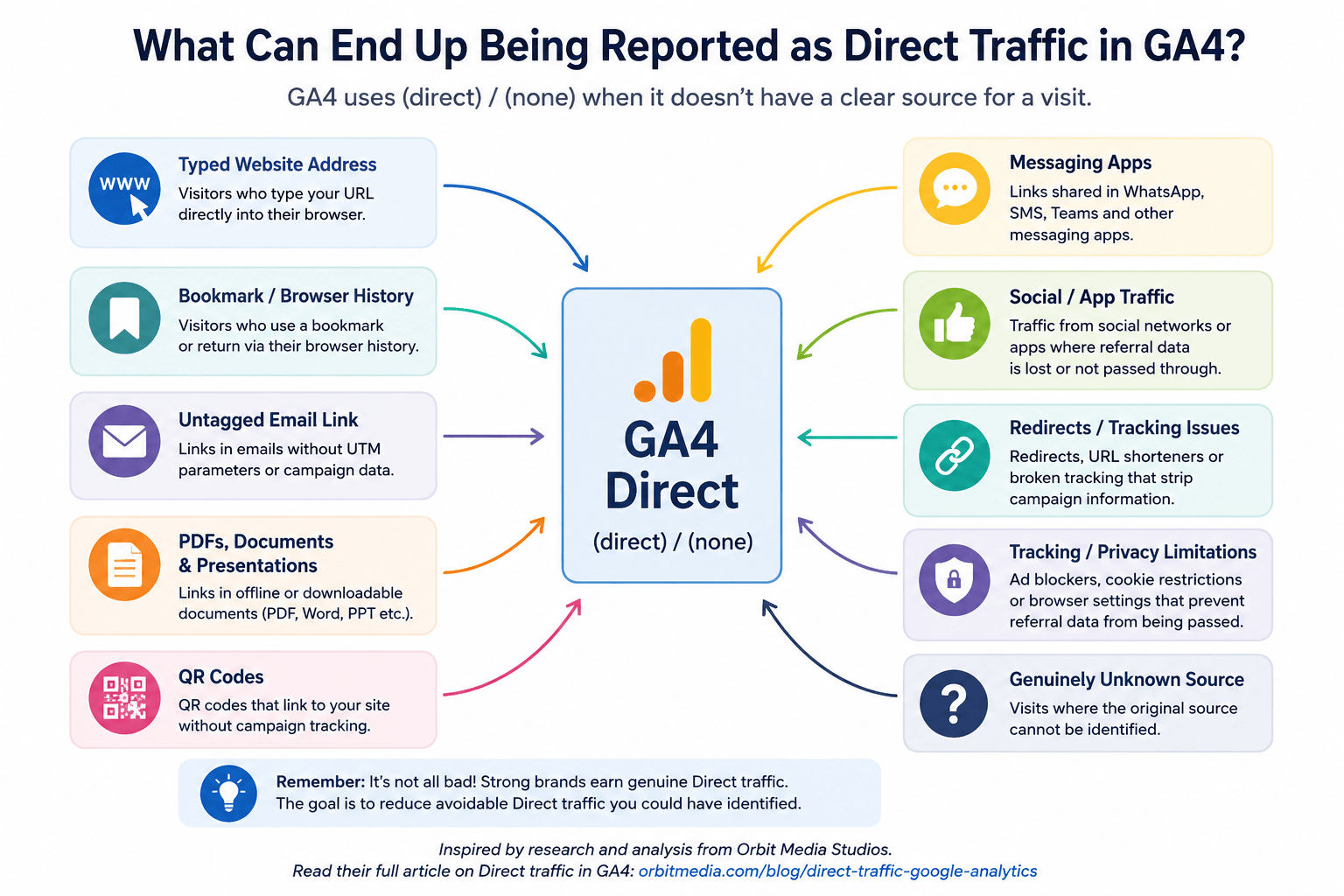
Orbit makes an important point: Direct traffic isn’t necessarily bad. A strong brand may generate substantial Direct traffic because people know the company already, have used it before, have bookmarked the website or have been recommended to it.
I agree, but there is another question worth asking:
How much of your Direct traffic really needs to remain Direct?
If somebody clicked a link in your email newsletter, scanned a QR code on your brochure or clicked a link in a downloadable PDF, wouldn’t you rather see that information in GA4 than have the visit disappear into Direct?
Start by opening Google Analytics 4 and going to:
Reports → Acquisition → Traffic acquisition
The Traffic acquisition report is designed to show where both new and returning website visitors came from during their sessions.
You should see traffic separated into channels such as:
Look for Direct and see what proportion of your sessions it represents.
Look at (direct) / (none) too
You can investigate further by looking at the Session source / medium dimension.
For Direct traffic you will commonly see:
(direct) / (none)
In simple terms:
GA4 reports (direct) / (none) where there isn’t sufficient information to identify those things reliably.
That’s why thinking of Direct purely as “people who typed our URL” can be misleading.
Landing pages can provide useful clues.
If most of your Direct visitors land on:
yourwebsite.co.uk/
… that’s perfectly plausible. People often type home-page URLs, use bookmarks or return through their browser history.
But what if substantial Direct traffic lands on something specific like:
yourwebsite.co.uk/resources/specialist-commercial-property-tax-guide/
Did all those visitors really type that full address into their browser?
Probably not.
Some may have clicked a link in an email, PDF, messaging app or other source where attribution was unavailable.
This doesn’t prove where the traffic came from, but it gives you somewhere useful to start investigating.
There are two broad categories.
This is traffic where Direct is a perfectly reasonable classification.
Examples include someone:
You generally can’t – and shouldn’t – try to turn those visits into another marketing channel.
This is the part worth investigating.
Google specifically identifies several causes of (direct) / (none), including links without suitable campaign information, missing integrations with advertising platforms, redirects that strip tracking parameters, links from offline documents and interference from ad blockers.
This is where better marketing tracking can make a significant difference.
UTM parameters add information to a URL that tells Analytics more about where the visitor came from.
Three particularly important parameters are:
utm_source
utm_medium
utm_campaign
Google recommends using these consistently when creating manually tagged campaign URLs.
You can create them via the Google url builder.
Imagine you normally link to:
https://www.example.co.uk/guide/
A link from your email newsletter could instead look something like:
https://www.example.co.uk/guide/?utm_source=newsletter&utm_medium=email&utm_campaign=august_2026
When somebody clicks it, GA4 has much more information available to attribute the session correctly.
Instead of disappearing into Direct, you may be able to identify the source, medium and campaign responsible.
Don’t create UTMs randomly every time you need one.
Google treats parameter values as case-sensitive. So inconsistent naming can fragment your reporting.
For example:
FB
facebook.com
… could create an unnecessarily messy dataset.
Establish a simple naming convention and keep a record of the UTMs being used.
Email is a classic example of traffic that businesses should generally be able to identify more accurately.
Consider links within:
Where appropriate, use campaign tracking so GA4 knows that the visit originated from email.
For example:
utm_source=customer_newsletter
utm_medium=email
utm_campaign=summer_offer
This isn’t just about reducing Direct traffic. It allows you to answer a much more useful question:
How much website traffic, engagement and ultimately business did that email actually generate?
Google specifically lists visits from offline documents such as PDFs and Word documents as a potential source of Direct traffic.
This is easy to overlook.
Think about all the documents your business distributes:
If those documents contain ordinary website links, subsequent visits may be difficult to attribute.
Where you control the document, use a tagged URL.
For example:
utm_source=buyers_guide
utm_medium=pdf
utm_campaign=product_research
You can then begin measuring whether the document is actually encouraging people back to your website.
A QR code should not automatically point to an ordinary, untracked URL.
Suppose you use QR codes on:
Instead of encoding:
example.co.uk
create a tracked URL first and encode that.
For example:
example.co.uk/?utm_source=summer_brochure&utm_medium=qr&utm_campaign=summer_2026
A different QR code used at an exhibition could have its own source or campaign information.
You can then distinguish between people arriving from your brochure and those arriving from the exhibition rather than having both potentially disappear into Direct.
Links can also be shared through environments such as WhatsApp, SMS, Teams and other messaging systems.
You obviously cannot control how one customer privately shares your website with another.
But you CAN improve the tracking of links your own business deliberately distributes.
For example, if your sales team sends prospects a particular page through WhatsApp, you could provide them with a suitable tagged link.
The principle is simple:
If you control the link and knowing its source would be useful, consider tracking it.
Referral information isn’t always preserved perfectly as visitors move between websites and apps.
Where you are deliberately running a social campaign, use appropriate campaign tracking rather than relying entirely on GA4 to work out where every visit came from.
This is particularly useful where you want to distinguish between:
The objective isn’t merely to make the Direct number smaller.
It’s to give the activity that generated the visit the credit it deserves.
Manual UTMs aren’t the best solution for every traffic source.
GA4 can also obtain traffic-source information through integrations and auto-tagging from advertising platforms. Google recommends integrating supported advertising platforms or manually tagging URLs so that traffic-source information is available.
If you are paying for advertising but significant amounts of resulting traffic are being categorised as Direct, checking the platform integration and tagging setup should be a priority.
Suppose somebody clicks:
Campaign link → old webpage → redirect → new webpage
What happens to the UTM parameters?
Google specifically warns that redirects can strip campaign information from URLs and cause traffic to appear as (direct) / (none). URL-shortening services can also sometimes cause referral information to be lost.
Test important campaign links yourself.
Click them.
Follow the entire journey.
Check the final URL.
Then verify how the session appears in GA4.
Never assume that because tracking existed at the beginning of the journey it survived to the end.
UTMs should normally describe how somebody arrived at your website, not how they subsequently navigated around it.
So don’t start adding campaign parameters to links between your own pages simply because you want to know which buttons people click.
GA4 already has mechanisms for analysing onsite behaviour and events.
Using acquisition campaign parameters for internal navigation can interfere with the traffic-source information you are trying to improve.
This area has changed significantly.
Since May 2026, GA4 has provided a dedicated AI Assistant channel for recognised referral traffic from AI assistants such as ChatGPT, Gemini and Claude. Google says qualifying traffic is assigned an ai-assistant medium and an AI Assistant default channel classification.
Traffic from Google’s own AI Overviews and AI Mode is classified within Organic Search.
However, AI can still influence journeys that Analytics cannot neatly attribute.
For example, somebody could discover your company through an AI answer, remember your name and visit your website later.
That subsequent visit might legitimately appear as Direct.
This illustrates an important limitation of attribution generally:
Analytics measures identifiable journeys. It cannot perfectly reconstruct everything that influenced a human being before they arrived.
Even with excellent tracking, Direct will never disappear.
And nor should it.
You may never know the original influence behind someone who:
This is why a falling Direct percentage isn’t automatically evidence of better marketing – and a high Direct percentage isn’t automatically evidence of poor analytics.
If Direct accounts for a significant proportion of your GA4 traffic, work through this process:
You might then see Direct traffic decrease while Email, Social, Referral or individually tracked campaigns increase.
Your total traffic hasn’t necessarily changed.
Your understanding of where that traffic came from has.
Not necessarily.
Orbit Media argues that genuine Direct traffic can be viewed as an indicator of brand strength: people know you, return to you, bookmark you, recommend you and seek you out without needing Google, advertising or another platform to send them there. Their research found Direct to be one of the largest and most consistent sources of website traffic across the GA4 accounts they analysed.
That is valuable.
The problem is when genuinely attributable marketing traffic is mixed into the same bucket.
So don’t make “reduce Direct traffic” your objective.
Make your objective:
Reduce unnecessarily unattributed Direct traffic.
Track the visits you realistically can.
Give your email, documents, QR codes, advertising and campaigns the attribution they deserve.
And once you have done that, don’t be worried about the Direct traffic that remains.
It may be telling you something very positive about your brand.