
Broken links on a website aren’t just annoying – they quietly erode trust, damage your SEO, and can cost you sales or enquiries without you even realising.
As someone who has worked with thousands of businesses across the UK – focused on improving website performance – I’ve seen how broken links are often an overlooked causes of lost visibility and conversions. The good news is: they’re also one of the easiest issues to detect and fix – if you have the right tools.
In this guide, I’ll share:
This example shows that 11 broken links were found on that website, and it includes information showing where those links are found:
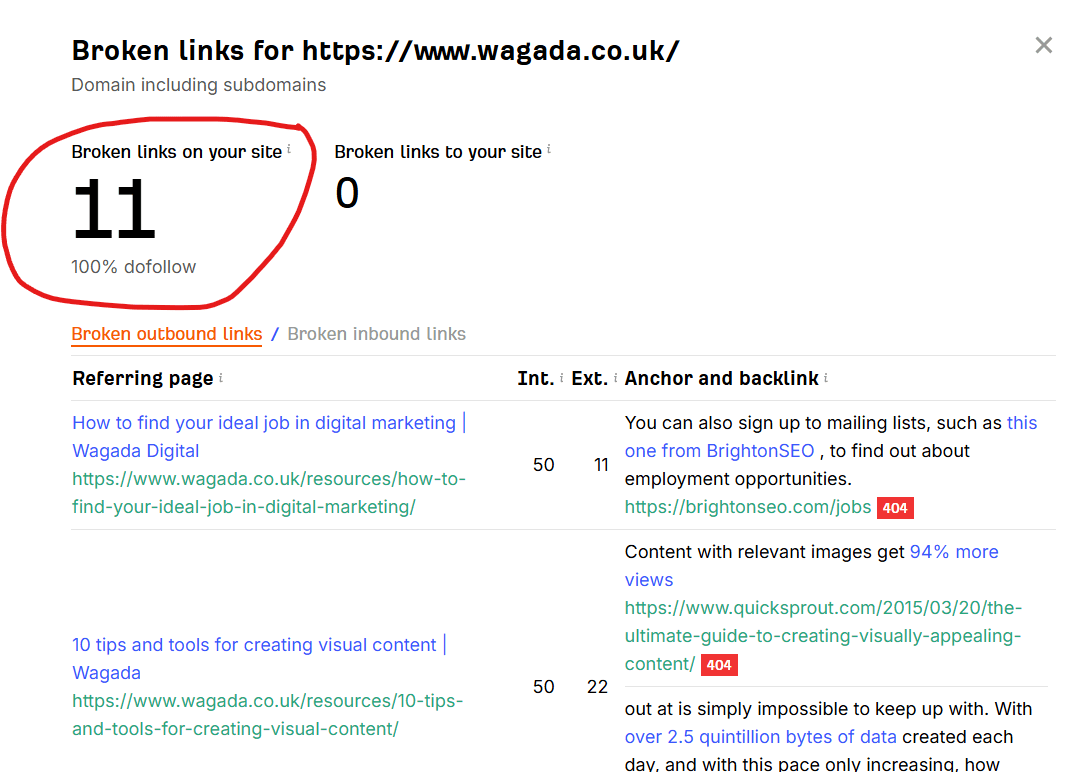
It’s an interesting example because I first found those broken links in May 2025 and it’s now November 2025 – and who knows how long they were broken before I saw them!
They’re a perfect example of a business that’s not on top of their broken links, and who are probably paying some SEO penalty for it.
Apart from anything else, a human experiencing those broken links could be deterred from making contact because of their lack of attention to detail. That, and many other reasons why broken links on websites are a problem.
I’ve broken these into categories so you can find what suits your situation best – whether you’re a one-person business owner or part of a digital team.
https://www.brokenlinkcheck.com/
https://www.deadlinkchecker.com/
https://ahrefs.com/broken-link-checker
https://www.screamingfrog.co.uk/seo-spider/tutorials/broken-link-checker/
https://www.semrush.com/features/site-audit/
https://chromewebstore.google.com/detail/check-my-links/aajoalonednamcpodaeocebfgldhcpbe?pli=1
This is the bit most people gloss over – and that’s a mistake.
If you’re serious about ranking higher in search, converting more visitors, or just not losing sales, you have to understand the real impact broken links are having.
Yes, Google has a budget for how much of your site it’s willing to crawl.
Every time a bot hits a dead-end (like a broken link), it’s time wasted. That means:
Especially on larger sites, broken links can create crawl bottlenecks that slow everything else down.
Internal links help spread authority through your site. But if those links point to 404 pages, that authority hits a wall.
If external websites link to a page that no longer exists (and there’s no redirect), you lose valuable backlinks – one of Google’s most trusted ranking signals.
If someone clicks a key link – pricing, services, contact – and lands on a 404, they leave. You rarely get a second chance.
Broken links signal neglect. For a business, that can mean lost trust and lost sales.
Broken links interrupt site flow. That affects how search engines understand your content, structure, and importance.
Q. Do broken links really matter if I only have a small site?
A. Yes – fewer pages means each one matters more.
Q. Are 404 pages always bad?
A. Not if intentional. But links pointing to them should be fixed or redirected.
Q. Should I redirect every broken link?
A. Only if there’s a relevant new page. Otherwise, remove or let it 404.
Q. Can broken links cause Google penalties?
A. Not directly, but they hurt quality signals and user experience.
Q. Best tool for internal links?
A. Screaming Frog or Sitechecker.
Q. Can broken links hurt Google Ads?
A. Yes – they lower quality score and conversions.
Q. Should I check links on desktop and mobile?
A. Yes – especially if your site loads elements dynamically.
Q. How many broken links is too many?
A. Even one broken link on a key page is too many. Prioritise fixing those first.
Fixing broken links isn’t glamorous, but it’s one of the easiest ways to improve your SEO, user experience, and trust.
It’s only part of the picture though – you could have all your links working perfectly but other elements within your website could be damaging your potential to get enquiries.
You may have got here thinking about fixing broken links but if there’s a nagging feeling that something else may not be right, feel free to contact me for a no-obligation chat through your website – 9/10 times I’ll find something that’s stopping you from getting enquiries, so you’ll get something valuable from it.