
It sounds great being able to see the names of companies that visited your website, but it does have these limitations:
Identifying companies that visited is helpful if you have the expertise to follow up and get engagement that leads to sales, but it’s just one part of all the different things you need to get more results from your website visitors.
I’ve been involved in tracking identifiable website visitors since 2012 and in that time I’ve seen a lot of lies from others who make bold claims.
If someone from a company visits your website then they will be one of these:
The range of identifiable companies tracked can be wide, depending on your website and marketing, but a normal expectation would be to see 5-25% of your total website visitors as being identifiable as a company.
Here’s an example, summarising identifiable companies that visited a website one day, which represented 14% of their total website visitors:
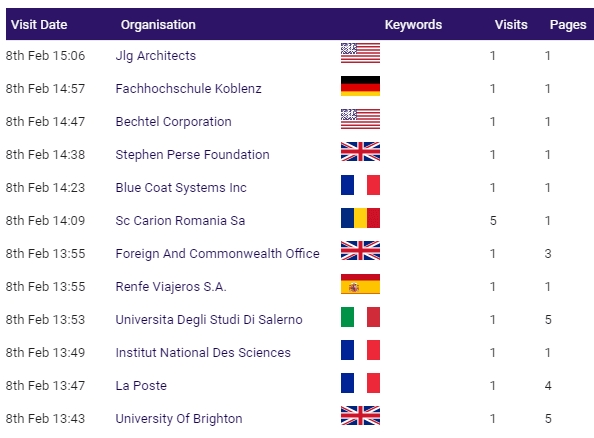
For all those website visitors who can’t be identified by company name, you have no way to follow up with them because you don’t know what company they were from.
This means that if you’ve never invested in companies identification before then I advise that you tread carefully before committing too much time or budget to any service.
There are many ‘companies identification’ providers nowadays (there were only two when I started working in this subject). The good ones allow you to:
In short: No!
There are some providers who claim that you can, but you can’t.
The only situation where a person from a company would be identifiable is if they had already previously engaged with your website. For example, someone from ABC Ltd fills in a form on your website, or responds to an email, and then they become ‘known’ in your CRM system (e.g. Hubspot).
People who are ‘cold’ can only be identified by their company name and what they looked at page by page on your website. Here’s an example:

If someone from an identifiable company goes to your website, doesn’t make contact, and you successfully follow up with them, then that’s great BUT …
You still have to go to all that effort to find the right person to engage with, AND there will be many ‘company visitors’ who can’t be identified.
The Who Visits My Website software also tracks ALL website visitors (as well as identifiable companies), unveiling patterns of what’s working and what’s failing within websites and the marketing used to send people to those websites.
The majority of ‘company people’ don’t make contact after visiting websites because something failed to engage them.
When you work on strengthening your website and marketing then you will get more people proactively contacting you instead of you having to chase those that can be identified by company name.
Your business will have a different culture/mindset to your competitors and what’s viable/comfortable for one business may not be for others.
These are my insights into the methods that companies have successfully used (based on 6,300+ companies that I’ve personally worked with over 25+ years). It’s your choice which resonate with you …
One of the fastest ways to connect with a potential lead is by picking up the phone and calling their company.
To increase your chances of success, aim to speak with someone in the department most aligned with the interests shown by the visit to your website.
Before calling, it’s a good idea to use LinkedIn to identify the name of the most relevant person. This approach helps you avoid being routed to the wrong person, increasing your chances of reaching the right contact.
When you make the call, be prepared to navigate gatekeepers and be prepared with a friendly, non-intrusive approach. If however, the gatekeeper blocks you from speaking to someone, they might still provide an email address to follow up with, giving you another avenue to pursue.
Keep in mind that while it’s possible the person you get to speak with was the person who visited your website, it’s more likely they didn’t. A cautious yet professional introduction can go a long way and here’s an example script to consider:
Good Morning/Afternoon [Name], this is [Your Name] from [Your Company]. As a proactive business, we noticed someone from [Their Company Name] visited our website yesterday. I thought it could have been you, but I’m probably wrong! Just to let you know, the website visitor seemed to show interest in [specific products/services viewed].
This introduction gives them room to respond naturally. If it wasn’t them who visited your website then they might still direct you to the appropriate person or share a contact for follow-up. In some cases, they may deny any knowledge of the visit—this is common and could be due to internal communication gaps, especially in larger companies.
Subscribers of companies identification tools often report significant success from making these proactive calls. Tenacious salespeople, in particular, thrive on the challenge of turning rejections into opportunities. Some even keep their software open all day, identifying company visits in real-time and calling within minutes. This level of proactivity can impress recipients, setting you apart from the competition and increasing the likelihood of turning leads into business.
People’s reactions generally fall into one of three categories:
Many businesses receive a flood of impersonal sales pitches, so a well-timed and tailored call stands out. Even if your website didn’t fully win them over initially, your effort to get further dialogue can leave a strong impression.
Try ringing the company at a time when you believe there won’t be anyone to answer your call, but not too late in the day – roughly 5.30pm onwards would be a good time.
The point of doing this is so that you can leave a voicemail (or message with the person who takes your call, if you do get a human response at that time). That message left would refer to you wishing to talk to the person who visited your website recently and who seemed to be interested in [here you insert what you offer and that the website visitor looked at on your website].
Ringing out of hours avoids people feeling caught out by a call and, if the voicemail/message has got through to them, they will at least be aware that you are likely to call back. They can of course ask gatekeepers to reject you but they may also take your call because they do have an interest, appreciate the breathing space you’ve given them from the message left, and be in a better mindset for your call.
If you lack the resources or feel uncomfortable making calls to companies that have visited your website, outsourcing this task to professionals could be an excellent solution.
External providers who specialise in this type of work are often skilled at making these calls more effectively and comfortably than an in-house team might, and while the term “telesales” may bring up negative connotations, many proactive telesales operations use a far more refined and subtle approach, typically working within guidelines that you provide.
Many of my companies identification software customers who outsource their phone calls achieve strong results using a process like this:
This approach removes the stress of making cold calls and puts the task in the hands of experienced professionals who are comfortable and skilled in this type of work.
If outsourcing seems like the right option, it’s wise to start with a small-scale test to assess effectiveness. For example:
Unfortunately, many telesales providers shy away from smaller projects. I believe that’s short-sighted, as those initial trials often lead to larger, long-term engagements. Finding a provider willing to rtake on a smaller test project can be an excellent way to identify the right fit for your business.
I’ve heard both positive and negative feedback about outsourced call providers. While some companies excel at delivering results, others may not meet expectations. That’s why it’s important to run short trials, including with multiple providers, until you find the one that aligns with your needs.
When you know the name of a company that has visited your website, LinkedIn becomes a powerful tool for narrowing down potential contacts. By filtering employees within that company, you can pinpoint individuals who might have been the ones exploring your site.
If using the software I provide, you will see a LinkedIn icon next to the name of any identified companies, which makes it easy to jump straight to the company’s LinkedIn page.


Next, you need to:
Here’s an example of a suitable LinkedIn connection request message:
Hello [Their Name],
I visited your profile because we saw that someone from [Their Company Name] visited our website, [Your Website Name], on [Date]. They explored pages related to [Details of Content Viewed].
I wondered if you would know who that person may have been, as I’m here to help?
[Your Name]
The response rate may not be spectacular but this is effectively a copy/paste task with slight modifications that shouldn’t take you long. And, if your first two connection requests get no response in a few days then there’s nothing to stop you sending the same to other people that may match potential buyers within the company.
After identifying the name of a company that’s been to your website, you then use LinkedIn to identify people who could feasibly have been interested in what you offer.
People don’t receive much in the post anymore so you can stand out by sending them something. How much effort you put into this depends on your budget and how confident you feel that the recipient(s) will be responsive. These options range from lower to higher cost …
Printed communications stand out more than electronic communications but it’s still a numbers game.
What’s important is that you measure the responses you get compared to the time/budget invested.
And remember: you’re sending to people in companies that you know have been to your website and so you have an opportunity to impress them when your competitors may not be tracking which companies go to their websites.
Here’s just one example of how you could combine several methods together, having identified that a company has visited your website …